The ClickFunnels AI funnel builder is called Build with AI, and since 18 September 2026 it has been out of beta and switched on in every workspace, with no opt-in. You describe your business and your goal, and it builds the funnel and its steps, designs the pages, writes the copy and generates images. Every plan lists an AI Tools allowance, from 1M words on Launch ($97/mo) to 10M on Dominate, and you can try it in the 14-day free trial through our link ($0 due today, card required). What it gives you is a first draft: your offer, products, payments and domain are still yours to add (all checked 8 October 2026).
We may earn a commission if you sign up through links on this page, at no extra cost to you. This does not affect our ratings — see how we test.
Start the 14-day ClickFunnels free trial and open Build with AI →
What is the ClickFunnels AI funnel builder?
Build with AI is the AI builder inside ClickFunnels itself, not a separate app. ClickFunnels’ help centre describes it like this: “Describe your business and what you want to achieve, and it researches your market, designs your pages, writes your copy, generates images, and builds a complete funnel for you, all from a simple conversation.”
The same doc’s framing is more modest than the marketing: “a complete, designed funnel as a starting point in minutes.” Hold on to the words “starting point”.
The 18 September changelog entry that took it out of beta lists four things it does:
- Proven Recipes: “follows funnel recipes that already convert”.
- Parallel Generation: “builds multiple pages at once”.
- Reusable Sections: “saves sections you can drop into future builds”.
- Instant Revert: “changes go live immediately, and if one isn’t right, ask it to revert”.
The most useful line sits in the help doc’s FAQ: “Everything it creates is a normal ClickFunnels funnel. Edit it by hand, with the AI, or both.” It works on funnels you already have, too, so you aren’t locked into an AI-only format.
You can’t buy it on its own. It comes with a ClickFunnels plan, so the real entry price is $97 a month once the trial ends.
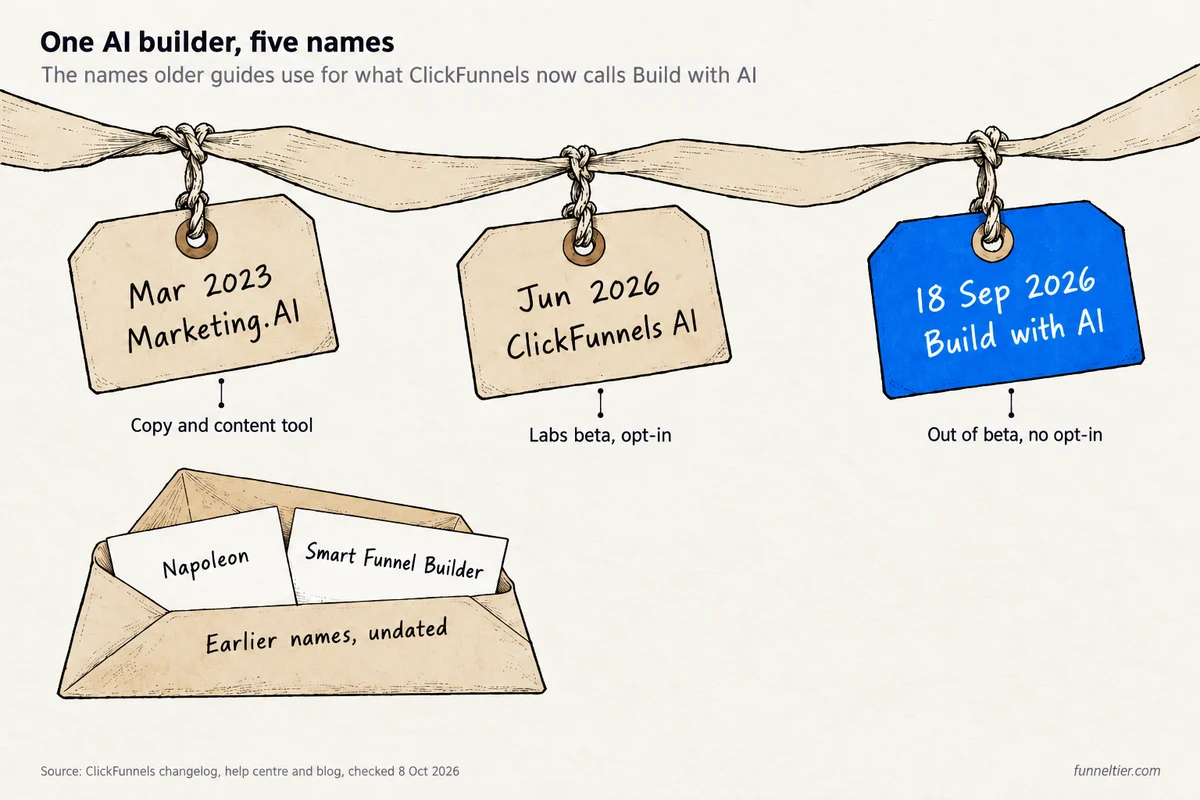
Old names you’ll still see: Napoleon, Smart Funnel Builder, ClickFunnels AI
Nearly every third-party page about this feature predates the September release, so you’ll meet several names for the same line of AI tools:
"Napoleon AI rewrites your copy"
Napoleon is an earlier name. ClickFunnels' old Napoleon help page now opens the Build with AI doc.
"Click the Smart Funnel Builder button"
The help doc now calls the button on your funnels list Create With AI.
"ClickFunnels AI is a Labs beta you switch on"
It started as a Labs beta in June 2026. Since 18 September 2026 it's out of beta, with nothing to switch on.
"Marketing.AI writes your content"
That was the 2023 copy and content tool, first offered in beta to Funnel Hacking Live 2023 ticket holders.
Which ClickFunnels plans include Build with AI?
All of them. The help doc: “Build with AI is available to every team, with nothing to switch on. A team admin chooses which team members can use it.” Admins get it automatically. Anyone else needs the AI User role: an admin opens the Team members list, opens that person, enables AI User and saves.
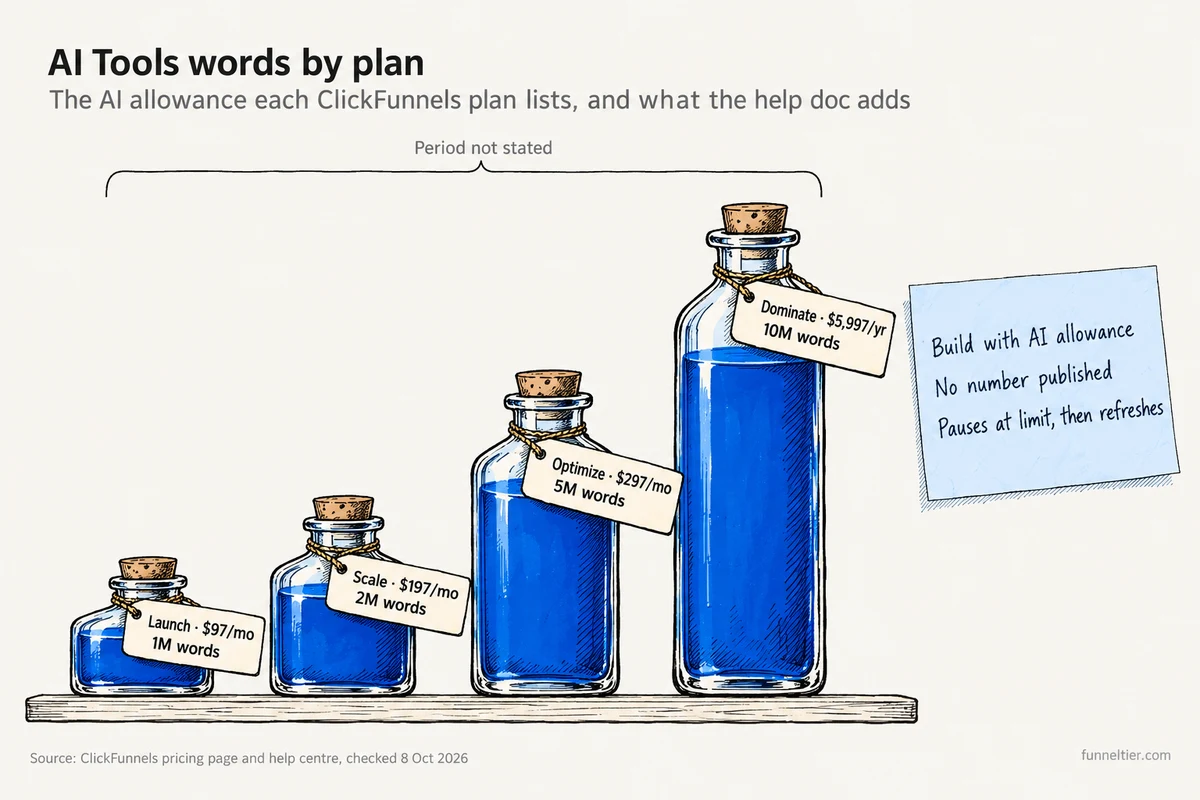
What changes between plans is the AI allowance printed on the ClickFunnels pricing page:
| Plan | Monthly | Annual | AI Tools allowance |
|---|---|---|---|
| Launch | $97/mo | $970/yr (≈ $81/mo) | 1M words |
| Scale | $197/mo | $1,970/yr (≈ $164/mo) | 2M words |
| Optimize | $297/mo | $2,970/yr (≈ $248/mo) | 5M words |
| Dominate | Not offered | $5,997/yr | 10M words |
Last verified: 8 October 2026.
The table leaves two gaps. ClickFunnels doesn’t say whether those words are monthly or a total; neither the pricing page nor the help centre’s pricing doc gives a period, so treat reviews that quote a monthly figure with caution.
And the Build with AI help doc doesn’t put a number on its own limit. It says each team has a usage allowance for AI activity that “refreshes on a regular cycle”, and the AI sidebar shows your usage as you go. At the limit, “new requests pause, and you’ll see a notice in the sidebar.”
The trial has a catch: “trial accounts can activate a subscription to continue”. If you run out during the 14 days, you keep going by paying early. ClickFunnels doesn’t publish the size of the trial allowance.
Don’t pick a plan for the AI words. Launch already includes unlimited funnels, 10K contacts, 50K emails a month, 2 team members, 3 courses and 5 custom domains; Scale adds the custom code editor and webhooks with full API access. Our breakdown of every ClickFunnels plan and price covers the rest.
Test ClickFunnels Launch or Scale free for 14 days, $0 due today →
How to build a funnel with ClickFunnels AI, step by step
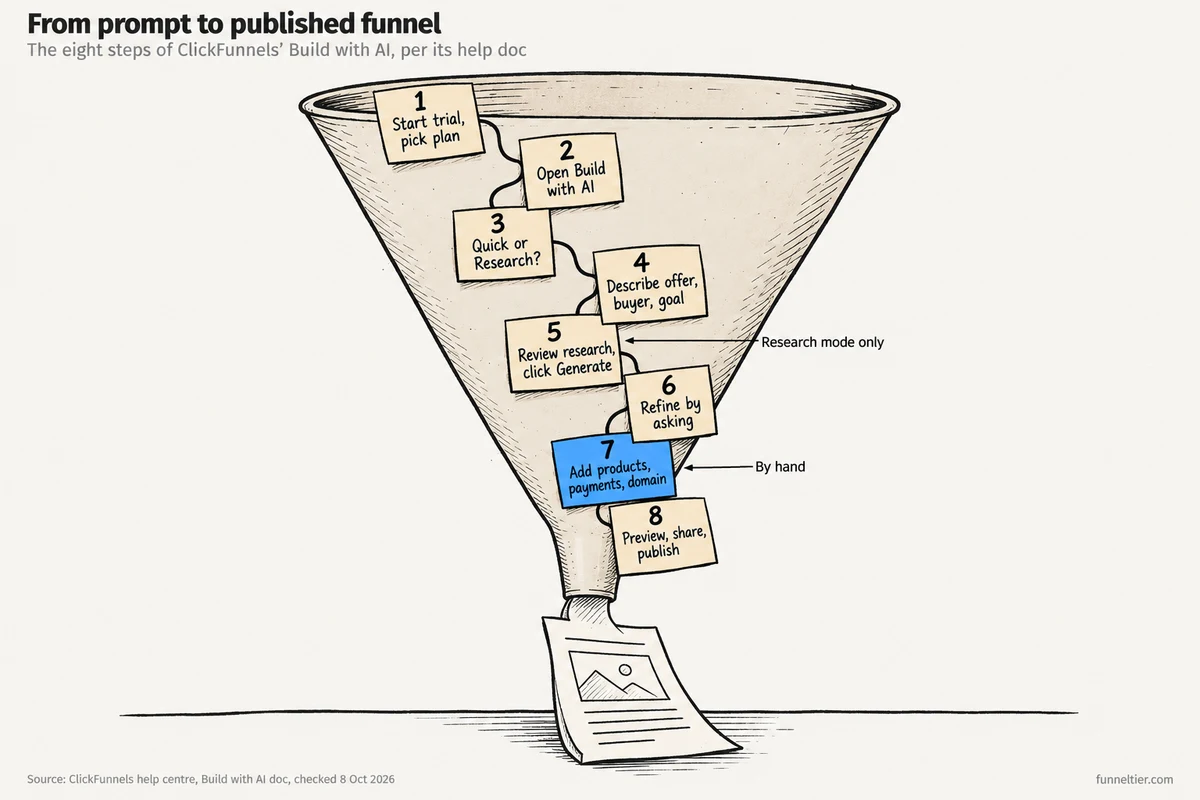
These eight steps take you from an empty ClickFunnels account to a published funnel. We haven’t run Build with AI on a test account for this guide, so the walkthrough comes from ClickFunnels’ own docs: the Build with AI help article (updated 16 September 2026) and the 18 September changelog. Where the advice is ours, we say so.
Before you start: what to have ready
The AI can write about your offer. It can’t invent one that sells. Write these down first:
- The offer and its price.
- Who it’s for, in one sentence.
- The one action you want: book a call, opt in, or buy.
- Proof: results, testimonials, credentials.
- Your logo and brand colours, if you have them.
If you can’t fill in the first line, you’re early for this tool. The One Funnel Away Challenge is built for that stage.
Step 1: Start the trial and pick your plan
Our link opens the “Start Your 14-Day Free Trial Now!” checkout on Scale Monthly: “14 days free from today, then just $197/month (plus applicable taxes)” and “$0 due today”. Launch sits on the same page at “$97/mo after your free 14-day trial”, and it’s enough to test the AI builder.
Your card goes in at the payment step and is charged when the trial ends. Some pricing-page buttons open a 7-day checkout instead, so check the day count before you enter your card. The checkout also offers 20+ funnel templates for $47; you don’t need them to use Build with AI. Our guide to how the free trial and refund window work has the full terms.
Step 2: Open Build with AI
“Open your workspace dashboard and Build with AI is ready to go, right at the top,” says the help doc. It asks about your business and your goal, with examples like “I’m a coach, and I want to book more calls.” You can also click Create With AI on your funnels list. Team member and see neither? Ask an admin for the AI User role.
Step 3: Choose Quick or Research mode
Quick mode goes straight from your description to pages. Research mode (“Switch the toggle to Research”) adds market research, a recommended funnel type and a design style first. We compare them below.
Step 4: Describe your funnel
In Quick mode, you “describe your funnel in the box”, and “you’ll land in the funnel builder with the AI sidebar open.” The sidebar asks a couple of quick questions, then builds “fully designed pages, with copy, ready to edit.”
Our advice: give it specifics. A generic draft usually gets price, audience, the action you want and tone wrong.
Example prompt (written for this guide, not one we ran): “I’m a fitness coach selling a $297 12-week online programme to busy parents. I want people to book a free 20-minute call. Tone: friendly, no hype.”
“Make me a fitness funnel” leaves the AI to guess all of that.
Step 5 (Research mode): Review the research, funnel type and style
With Research on, the help doc says the builder will:
- “Research your market live: trends, what’s working in your space, and your ideal customer (with their goals, pain points, and objections).”
- “Recommend the best funnel type for your goal, and explain why. You can accept it or choose a different one.”
- “Suggest design inspiration from comparable brands. Pick the style you like.”
- “Build your complete funnel by clicking Generate.”
Our advice: treat the customer research as a guess to check. If its objections don’t match what real buyers tell you, fix that copy in the next step.
Step 6: Refine by asking, then edit by hand
Once the pages exist, you type requests into the sidebar. The help doc’s examples include “Add an image of someone working out”, “Add an About Me section using these credentials” and “Add a footer.”
You can edit by hand, with the AI, or both. Save sections worth keeping as Reusable Sections for later builds. If a change goes wrong, Instant Revert means you ask the AI to undo it.
Step 7: Finish what the AI doesn’t do
The help doc describes pages, copy and images. It doesn’t say Build with AI creates your products, connects payments or sets up your domain, so plan to do these yourself:
-
Add your products and prices
Create them and attach them to the step where people pay.
-
Connect payments
Stripe connected directly carries no ClickFunnels fee and supports subscriptions, per the help centre.
-
Connect your domain
Launch allows 5 custom domains.
-
Write the follow-up emails
Whatever should happen after the opt-in or the purchase.
-
Place a test order
Buy from yourself once and check the receipt and delivery.
Our pricing guide lists the payment fees by setup.
Step 8: Preview, share, publish
“Click Preview to see your pages exactly as visitors will.” You can also create a share link, “no account needed on their end”, which helps when a client or partner has to sign off. Then publish it like any other funnel.
Build your first AI funnel free for 14 days →
Quick mode vs Research mode: which should you use?
Both modes end in a normal ClickFunnels funnel you can edit. The difference is what happens before the pages are built.
Our take: if your offer already sells on calls or by word of mouth, use Quick mode. You know your buyer better than a live web search does. Research mode earns its extra steps when you’re entering a new niche, or can’t decide between, say, a webinar funnel and a simple booking funnel.
What can’t Build with AI do?
“Builds a complete funnel for you” is easy to read as done-for-you, but the help doc’s own words are “a starting point”. These limits of the ClickFunnels AI funnel builder all come from what ClickFunnels has published:
- It doesn’t give you an offer. A vague description gets you a vague funnel.
- It doesn’t claim to handle the money side. The help doc covers pages, copy and images, and says nothing about products, payment gateways, domains or follow-up emails.
- Requests pause at the limit until the allowance refreshes. On the trial, continuing means activating a paid subscription.
- Edits go live immediately, per the changelog’s Instant Revert note. Our advice: if a funnel already takes traffic, duplicate it and experiment on the copy.
- Team members need the AI User role before they can use it.
- Japanese is the only other language in the changelog. Research mode accepted Japanese input from 17 July 2026, with full Japanese support on 31 July. Building in another language? Test it in the trial first.
It’s a poor fit if you hope the AI will decide what to sell, or if you only want landing pages and already run email and checkout elsewhere.
What is the ClickFunnels MCP server, and how is it different?
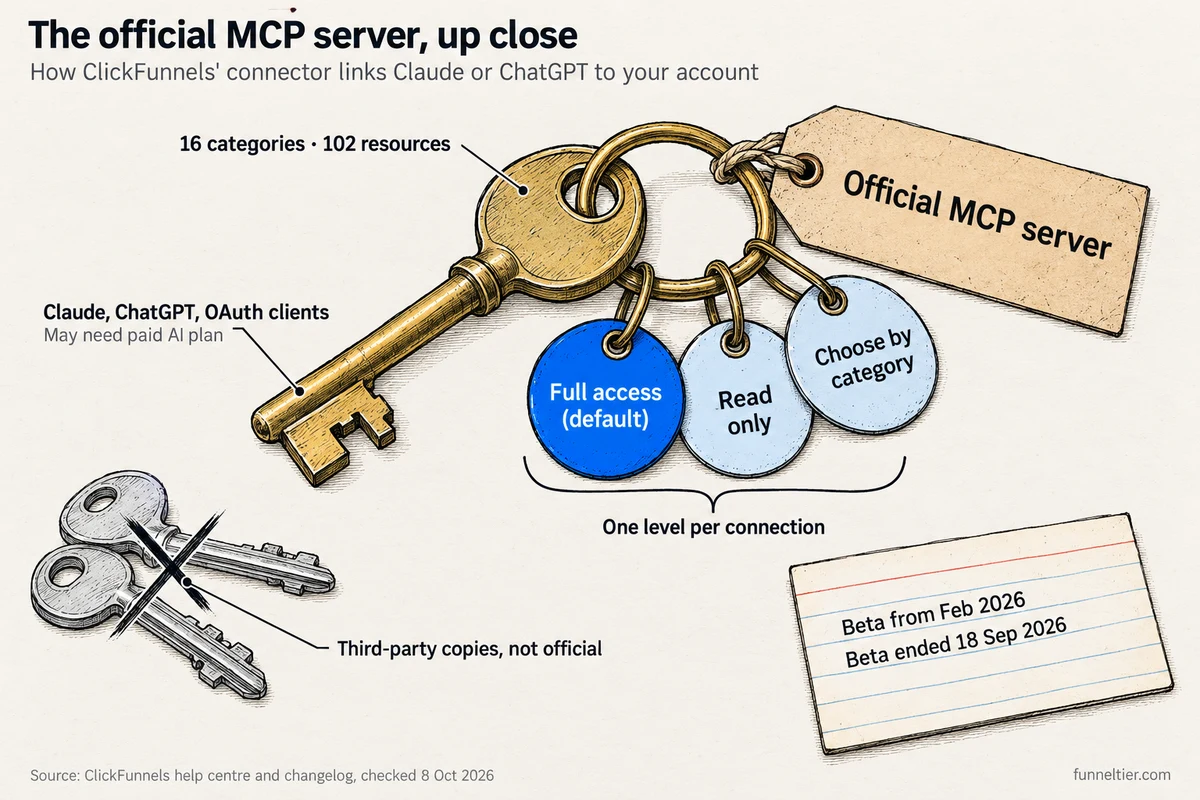
MCP (Model Context Protocol) is a standard that lets an AI assistant work inside another app. The official ClickFunnels MCP server came out of beta on 18 September 2026, in the same changelog entry as Build with AI. It had been in beta since February: its help doc was first published on 13 February 2026, and ClickFunnels’ beta announcement called it a “Technical Preview” and “a Labs feature with limited support coverage”.
The changelog’s summary: “Link your AI assistant to ClickFunnels over a secure, OAuth-authorized connection and manage contacts, funnels, courses, email, store and more through natural conversation.” It works with Claude (desktop or web), ChatGPT, or “any client that supports remote HTTP MCP servers with OAuth”, such as n8n or Manus.
To connect, open your AI client’s connector settings, add ClickFunnels from the directory or as a custom connector, sign in, pick workspaces, choose an access level and authorise. The levels are “Full access” (the default), “Read only” and “Choose by category”. One level applies to every workspace you grant, so workspaces that need different access need separate connections.
The help doc’s funnel example: “I’m launching a coaching program. Can you build me a funnel with an opt-in page, a sales page, and a thank you page?” It also covers products, which Build with AI doesn’t claim to: “Add a new product called Coaching Intensive at $499 and get checkout ready for it.” A 28 August changelog entry put the catalogue at 16 capability categories and 102 resources.
ClickFunnels states no plan restriction on its side, but “adding a custom connector may require a paid plan on your AI client.”
Official vs third-party ClickFunnels MCP servers
Search “clickfunnels mcp server” and most results aren’t ClickFunnels’ own. Pipedream, Activepieces, a community build and a Zapier connector for ClickFunnels Classic (the old product) all show up. Use the ClickFunnels connector in your AI client’s directory, or add the official one as a custom connector.
Build with AI or MCP: which to use
Use Build with AI for designed pages inside the funnel editor. Use the MCP server when you live in Claude or ChatGPT and want to work across contacts, products, courses and email from the chat. They combine well: draft pages with Build with AI, then set up the product and checkout from a chat window.
How to test the AI builder inside your 14-day trial
A 14-day ClickFunnels trial is long enough to judge the AI builder on a real offer. This is how we’d plan it:
Sign up and build
Switch to Launch at checkout, then run Research mode on your real offer.
Refine and finish
Edit the copy, add products, payments and your domain, then place a test order.
Send real traffic
Your list, your social accounts or a small ad budget.
Decide
Check your numbers and the usage meter in the AI sidebar.
First charge
Your card is billed for the plan you chose unless you cancel first.
The checkout says you can cancel “anytime, hassle-free” from your dashboard or by email. Miss day 14 and there’s still a “30-day money back GUARANTEE after your trial ends”. On the 14-day path that makes the 44 days ClickFunnels’ help centre describes; a 7-day checkout gives you less.
Hitting the AI limit mid-trial means paying early, so spend your requests on one real funnel rather than ten test ones.
Get 14 days free, then a 30-day money-back guarantee →
Is the ClickFunnels AI funnel builder worth it?
Yes, if you already have an offer and want a designed first draft that sits next to your email, CRM, courses and checkout on one bill. Build with AI shortens the blank-page part of building a funnel. The products, payments, domain and follow-up work take as long as before, and your offer is only as good as you make it.
On its own, though, it doesn’t justify $97 a month. If an AI page draft is all you want, you’d be paying for a stack you won’t use.
Pick it if: you sell coaching, consulting, a course or a service that already converts, and you’d rather edit a draft than start from a template.
Skip it if: money is tight. Systeme.io has a free plan, and our ClickFunnels vs Systeme.io comparison sets the two side by side. Our Systeme.io review covers its own MCP server.
Wait if: you have nothing to sell yet. Start with the One Funnel Away Challenge and come back with an offer.
For the verdict on the whole platform, read our full ClickFunnels review.
Try Build with AI on your own offer, free for 14 days →
Frequently asked questions
Does ClickFunnels have AI?
Yes. Build with AI builds the funnel and its steps, designs the pages, writes the copy and generates images. The ClickFunnels MCP server lets Claude, ChatGPT and other AI clients work in your account. Both came out of beta on 18 September 2026.
What is ClickFunnels' AI funnel builder called now?
Build with AI. Older pages call it Napoleon, the Smart Funnel Builder or ClickFunnels AI (the June 2026 Labs beta). On your funnels list, the button is Create With AI.
Is Build with AI included in every ClickFunnels plan?
Yes, with no add-on and nothing to switch on. A team admin chooses which members can use it.
How many AI words do you get on each ClickFunnels plan?
The pricing page lists 1M words on Launch, 2M on Scale, 5M on Optimize and 10M on Dominate, without saying whether that's monthly. The Build with AI help doc gives no number for its own allowance and says it refreshes on a regular cycle.
Can I use Build with AI during the free trial?
Yes. If you reach the usage limit, the help doc says trial accounts can activate a subscription to continue, which means paying before day 14. Our free trial guide covers the rest of the terms.
Can Build with AI edit a funnel I already built?
Yes. The help doc says it works on new or existing funnels, and everything it creates is a normal funnel you can edit by hand, with the AI, or both.
Why don't I see Build with AI in my account?
Team members who aren't admins need the AI User role, which an admin enables from the Team members list. Otherwise, check the top of the workspace dashboard or the funnels list.
What is the ClickFunnels MCP server, and is it still in beta?
It's an official OAuth connector that lets an AI assistant manage your funnels, contacts, products, courses and more by chat. It was in beta from February 2026 and has been out of beta since 18 September 2026.
Do I need a paid Claude or ChatGPT plan for the MCP server?
Possibly. ClickFunnels states no plan restriction on its side, but its help doc says adding a custom connector may require a paid plan on your AI client.
The bottom line
The ClickFunnels AI funnel builder is Build with AI, out of beta since 18 September 2026 and switched on in every account. Describe your offer in detail, pick Quick or Research mode, refine by asking, and expect to finish products, payments, domain and emails yourself.
What you get is a first draft inside a $97-a-month stack. Take a real offer into the 14-day trial, build one funnel properly, and let real traffic decide whether you stay.
Open a 14-day ClickFunnels trial and draft your funnel →
Ready to build your first funnel?
Start with ClickFunnels — the tool we test and recommend — and have a working funnel published today.
Start the 14-day free trial →