ClickFunnels for ecommerce works if you sell one hero product, a handful of SKUs, bundles or subscriptions, and you make your margin on order bumps and one-click upsells. It’s the wrong tool for a big catalogue store that lives on SEO, multi-channel inventory and fulfilment, and that is where Shopify wins. The 2026 version does have a real store (cart, collections, per-location inventory, ShipStation and Shippo, Zendrop dropshipping), with 1 store on Launch at $97/month and 5 on Scale at $197/month. You get a 14-day free trial through our link, card required, plus a 30-day money-back guarantee; everything below was checked 14 October 2026.
We may earn a commission if you sign up through links on this page, at no extra cost to you. This does not affect our ratings. See how we test.
Try ClickFunnels free for 14 days with your own product →
Is ClickFunnels good for ecommerce? The short answer
Yes, for one kind of store. ClickFunnels is built to sell an offer, not a catalogue. Every page pushes the buyer toward one checkout, and the checkout is where it earns its fee: an order bump, then a one-click upsell, then a downsell if they say no.
A Shopify store is built for browsing: people land, search, filter and compare. The case for ClickFunnels for ecommerce is that it sells a single offer harder than a store does.
Good fit:
- One hero product, or a small range
- Bundles and kits, where the add-on is obvious
- Subscription and refill products, such as coffee, supplements or skincare
- Digital plus physical combos, such as a printed book with a video course
- Paid-traffic launches, where every visitor lands on one page
Poor fit:
- Large catalogues that customers browse and filter
- Stores that grow mainly through Google search
- Inventory shared across marketplaces and retail channels
- Return-heavy categories, such as apparel with size swaps
- Wholesale or in-person selling
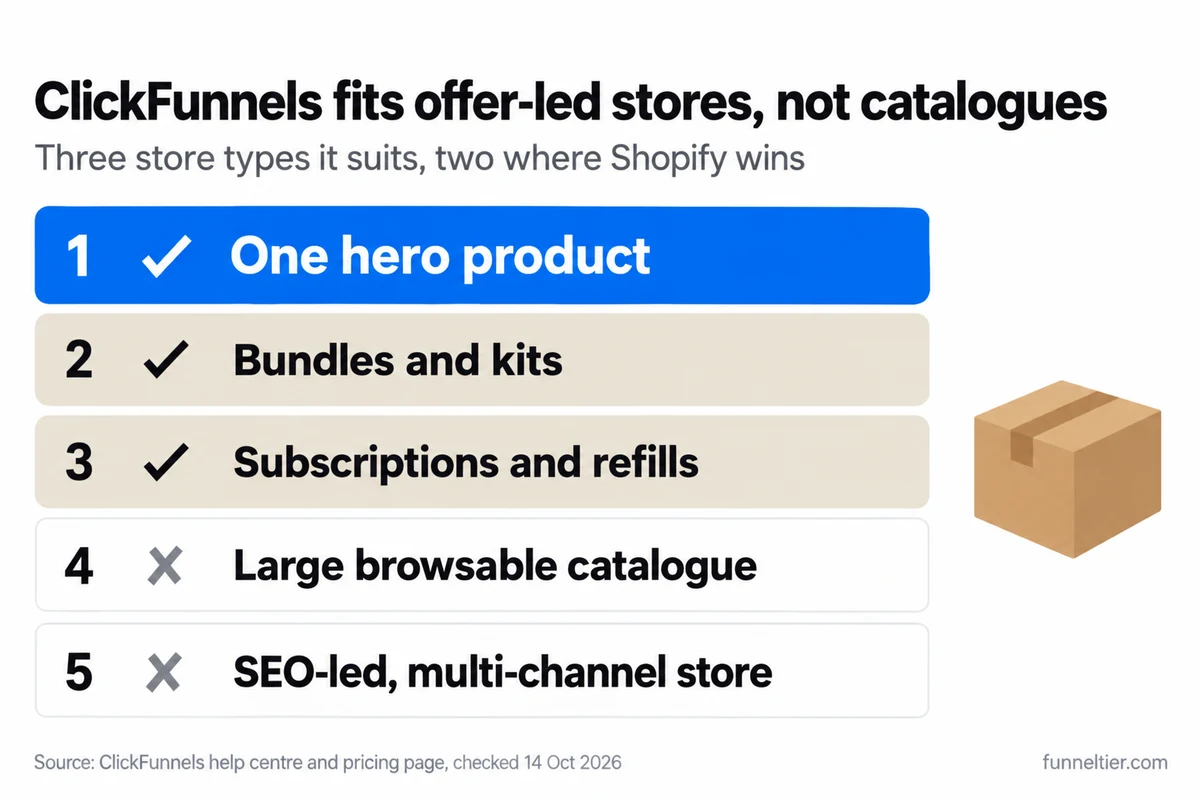
About half of the “ClickFunnels vs Shopify” pages ranking today come from Shopify agencies, and at least one still says ClickFunnels has no inventory management or carrier integration. That’s out of date. It tracks stock per location and pulls live USPS, UPS and FedEx rates through Shippo or ShipStation. Where it struggles is running a big catalogue.
If you want the platform judged beyond ecommerce, read our full ClickFunnels review.
ClickFunnels for ecommerce: what the store includes in 2026
ClickFunnels names nine ecommerce features on its pricing page, checked 14 October 2026:
The Store app vs a Storefront Funnel
The Store app is the full shop: a storefront, product pages and collections, a cart icon, and Add to Cart, which “allows customers to add multiple products to their cart”. Checkout uses an Order Summary and a Checkout element, and you can run store upsells in “Funnel Mode” or “Collection Mode”. To switch it on you need at least one product and either Payments AI or Stripe connected to the workspace.
The Storefront Funnel is the lighter option. ClickFunnels describes it as “a quick way to set up a simple online store to sell one or a few products without building a full e-commerce site”. It has three pages: Storefront, Order, Confirmation.
If you sell one or a few products, start with the Storefront Funnel. Move to the full Store app when shoppers need a cart.
Products, variants and price types
Each product can have up to three options, each option up to seven values, and up to 100 variants in total. Some reviews multiply 7 × 7 × 7 and promise 343. The help centre caps it at 100. A shirt in 7 sizes and 7 colours (49 variants) fits. Add a third option with 3 values and you’re at 147, over the cap.
Each variant gets its own description, images, pricing, tax, inventory and shipping settings. Tick “This is a physical product” and you get Weight and Country of manufacture fields, plus a SKU and a “Product is taxable” switch with a tax category.
Prices come in three types: one-time, subscription and payment plan. Subscriptions and payment plans can carry free or paid trials and setup fees. Each product or variant shows one visible one-time price, and the price type can’t be changed after you create it, so decide before you build.
Inventory and fulfilment
Inventory switches on with the “Fulfillment required” checkbox. The Inventory page shows SKU, Committed, On hand and Available (On hand minus Committed), and stock is tracked per location. You adjust stock with “Adjust by” or “New”, tagged Correction or Received, and the history is kept. A “Continue selling when out of stock” toggle covers pre-orders and backorders.
Fulfilment lives under Customers > Invoices > “Pending fulfillment”. You can fulfil part of an order, add a provider and tracking code, send an “Order Fulfilled” email, and “Restock items” to release units you didn’t ship.
Shipping and tax
Shipping profiles set rates for specific products, regions or zones. A rate can be $0.00 for free shipping, with optional minimum or maximum conditions on order weight or price.
For live rates, connect Shippo or ShipStation. Both pull USPS, UPS or FedEx rates, and “only the most affordable rate is displayed at checkout”. Shippo also prints labels and offers discounted postage. ShipStation receives orders automatically and keeps inventory updated across locations.
Tax is either built into the price or calculated automatically by Payments AI or Stripe Tax. Payments AI’s native tax covers the US, Canada, Australia, the EU and the UK. Multiple tax locations, TaxJar and tax reporting need Payments AI Pro, whose price we couldn’t find published.
The 2026 changelog adds order filtering by the funnel that made the sale (24 July), Under Attack Mode against card-testing bots (31 July), and Stripe Product Import (14 August), which pulls your active Stripe products straight in.
Where does ClickFunnels beat a normal online store?
At the checkout. ClickFunnels is built to raise the order value before and after the card goes in, without sending the buyer back to browse.
Order bumps at checkout
An order bump is a tick-box offer on the checkout itself. In ClickFunnels you attach a product to the Smart Checkout element, tick “Product is an order bump”, pick a Classic or Modern layout, and rewrite the bump’s title and description.
ClickFunnels’ own signup checkout is a live example. It offers 20+ funnel templates and graphics packs, “$197” struck through to “$47”, one-time, behind a “Check YES to add” box. For a physical brand the same slot holds the refill pack, the travel size or the second unit at a better price.
One-click upsells and downsells
ClickFunnels defines a One-Time Offer as “a follow-up offer shown to customers immediately after they complete a purchase”. Buyers from the previous step check out “without requiring them to re-enter payment information”. Each upsell button carries one product, one variation and one price. Say no, and a downsell page can follow.
One caveat before you build: ClickFunnels’ upsell guide lists a Payments AI-configured account as a prerequisite. Confirm with support during the trial if you plan to run upsells on direct Stripe, because it changes your fees (see the cost section).
Physical upsells raise a shipping problem: the bump, the upsell and the main order can become three parcels. ShipStation’s Hold Time setting fixes that by merging upsell and downsell purchases into one shipment.
Subscriptions and payment plans
On direct Stripe, “subscriptions and payment plans always use Stripe invoices”, and Stripe charges its own Billing fee on top. On Payments AI, recurring charges carry an extra 0.5%. Since 28 August 2026 you can turn imported Stripe subscriptions into ClickFunnels payment plans, which matters if you’re moving an existing subscriber base.
Dropshipping and private label
Zendrop plugs in through “Add from Zendrop” in Products. ClickFunnels takes the payment and sends the order to Zendrop, and you pay Zendrop the product and shipping cost. One Zendrop account covers up to 10 stores, one per workspace. Cancelling an order in Zendrop doesn’t cancel it in ClickFunnels, so you cancel in both places.
Supliful offers 250+ supplement products under your own label, shipped from the US. Orders sync automatically in live mode, and the “Fulfilled” status syncs back. Zendrop and Supliful each need their own subscription.
Build a hero-product funnel with a bump and upsell, free for 14 days →
Where does ClickFunnels fall short for physical products?
You’ll hit these gaps in your first week of selling physical goods on ClickFunnels. None is a dealbreaker alone, but stack enough of them and Shopify becomes the easier life.
- No full-store test mode. You test products one at a time. If your store is set to single-product purchases, you can’t test Add to Cart at all.
- Abandoned cart is a workflow you build. There’s no switch. You set an Opt-In or Pageview trigger, a delay, the emails, and a Conditional Goal step that checks whether the purchase went through.
- Returns aren’t covered. The fulfilment guide covers shipping, partial fulfilment and restocking, but not returns or refunds.
- Bundles don’t appear on the Inventory page, so bundle stock needs watching by hand.
- Imported Zendrop items aren’t stock-tracked. Inventory applies only to products created in your workspace.
- One payment processor per funnel.
- PayPal only through Payments AI, at +1% on top of PayPal’s own fees.
- No native Shopify sync. We found none in the help centre, only third-party routes.
- Shipping and sourcing apps cost extra. Shippo, ShipStation, Zendrop and Supliful are separate subscriptions.
- Stripe import has limits. Tiered, package and metered prices can’t be imported.
Which ClickFunnels plan does an ecommerce store need, and what does it cost?
Which plan fits your store
For ecommerce, the line that decides your ClickFunnels plan is the store count, not the price. Launch includes exactly 1 store. Run a second brand and you’re on Scale, whatever your revenue. Funnels and visitors are unlimited on every plan.
| Plan | Monthly | Billed yearly | Stores | Contacts | Emails/mo |
|---|---|---|---|---|---|
| Launch | $97 | $970 (≈ $81/mo) | 1 | 10K | 50K |
| Scale | $197 | $1,970 (≈ $164/mo) | 5 | 75K | 300K |
| Optimize | $297 | $2,970 (≈ $248/mo) | 10 | 150K | 750K |
| Dominate | n/a | $5,997/yr only | 20 | 400K | 1.2M |
Source: ClickFunnels pricing page, checked 14 October 2026.
Pick your plan from the first line that matches you:
- Launch, $97/month: one brand, under 10,000 contacts, and no need for webhooks or the API. Launch also caps you at 5 custom domains and 2 team members, with standard support.
- Scale, $197/month: 2 to 5 stores, more than 10,000 contacts, or you need webhooks, the full API or the custom code editor, which start on Scale. You also get priority support with live chat and unlimited domains.
- Optimize, $297/month: 6 to 10 stores, or more than 75,000 contacts.
- Dominate, $5,997/year: 11 to 20 stores, or more than 150,000 contacts. Annual billing only.
If you already know you need Scale, ClickFunnels is also running 3 months of Scale for $99, charged upfront with no trial, then $197/month. For the full limits, see every ClickFunnels plan and its limits or Launch vs Scale, compared line by line.
What you pay at 100, 500 and 2,000 orders a month
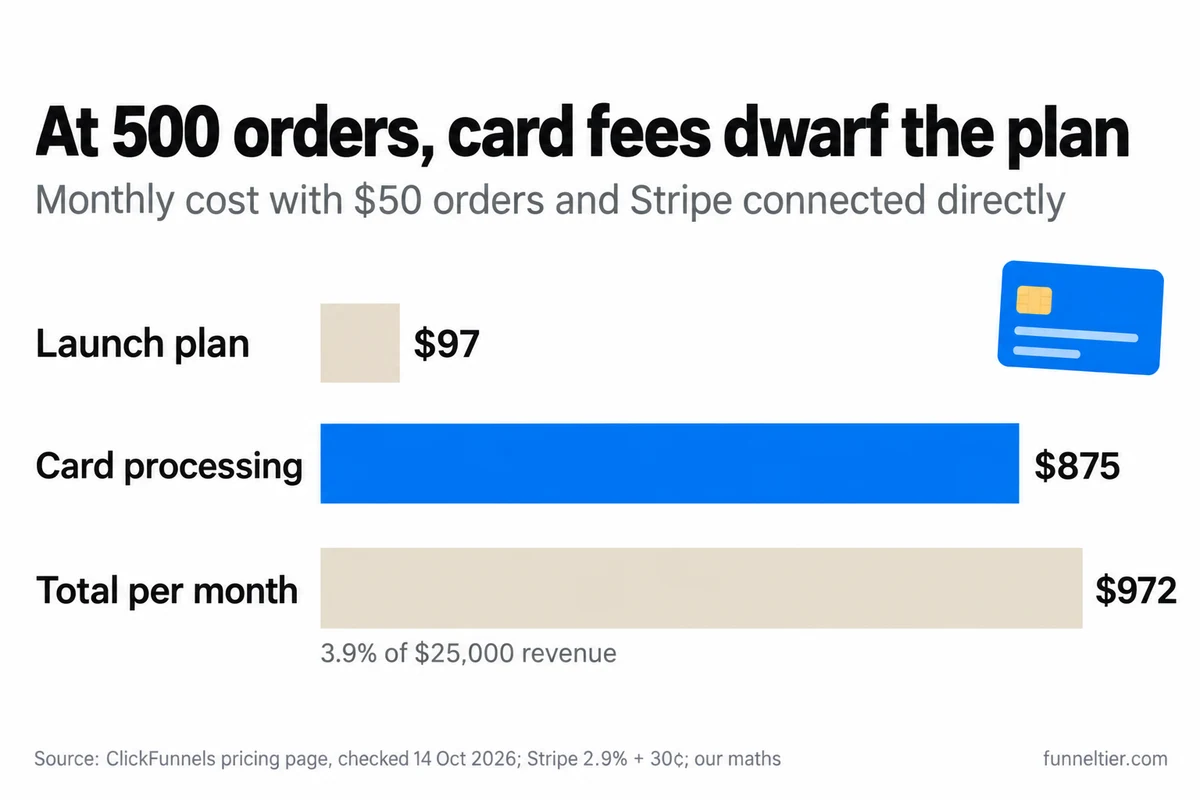
The plan fee is the small number. Card processing is the big one, and no ranking page models it. Our assumptions: a $50 average order, Stripe connected directly at 2.9% + $0.30 ($1.75 per order), monthly billing, and the plan fee only, with no Shippo, ShipStation or app costs.
| Orders/month | Revenue | Processing | Plan | Total | % of revenue |
|---|---|---|---|---|---|
| 100 | $5,000 | $175 | Launch $97 | $272 | 5.4% |
| 500 | $25,000 | $875 | Launch $97 | $972 | 3.9% |
| 2,000 | $100,000 | $3,500 | Scale $197 | $3,697 | 3.7% |
Most of the real cost of ClickFunnels for ecommerce is card processing. At 500 orders a month, card fees run about nine times the plan fee, so your processor choice matters more than your plan.
Three things move these numbers:
- The contact cap. Buyers and opt-ins count toward your contact limit. If every order is a new buyer and you collect no other leads, 500 orders a month fills Launch’s 10,000 contacts in about 20 months, and 2,000 a month fills it in about 5. Then you move to Scale, +$100/month. That’s why the 2,000-order row is already on Scale.
- PayPal. It only runs through Payments AI, at +1% on top of PayPal’s own fees. If every order went through PayPal, that’s +$50, +$250 or +$1,000 a month at the three volumes.
- Subscriptions. On Payments AI, each recurring charge carries +0.5%. On direct Stripe, Stripe’s own Billing fee applies instead.
The rule of thumb: connect Stripe directly unless you need PayPal, and confirm the upsell setup during the trial, because routing Stripe through Payments AI adds 1% (+$250 a month at 500 orders).
There’s no coupon code (we checked). If you’re planning a Q4 launch, read whether to wait for a Black Friday deal before you pay.
Run your own margins on a 14-day free trial →
ClickFunnels vs Shopify: which should an ecommerce seller pick?
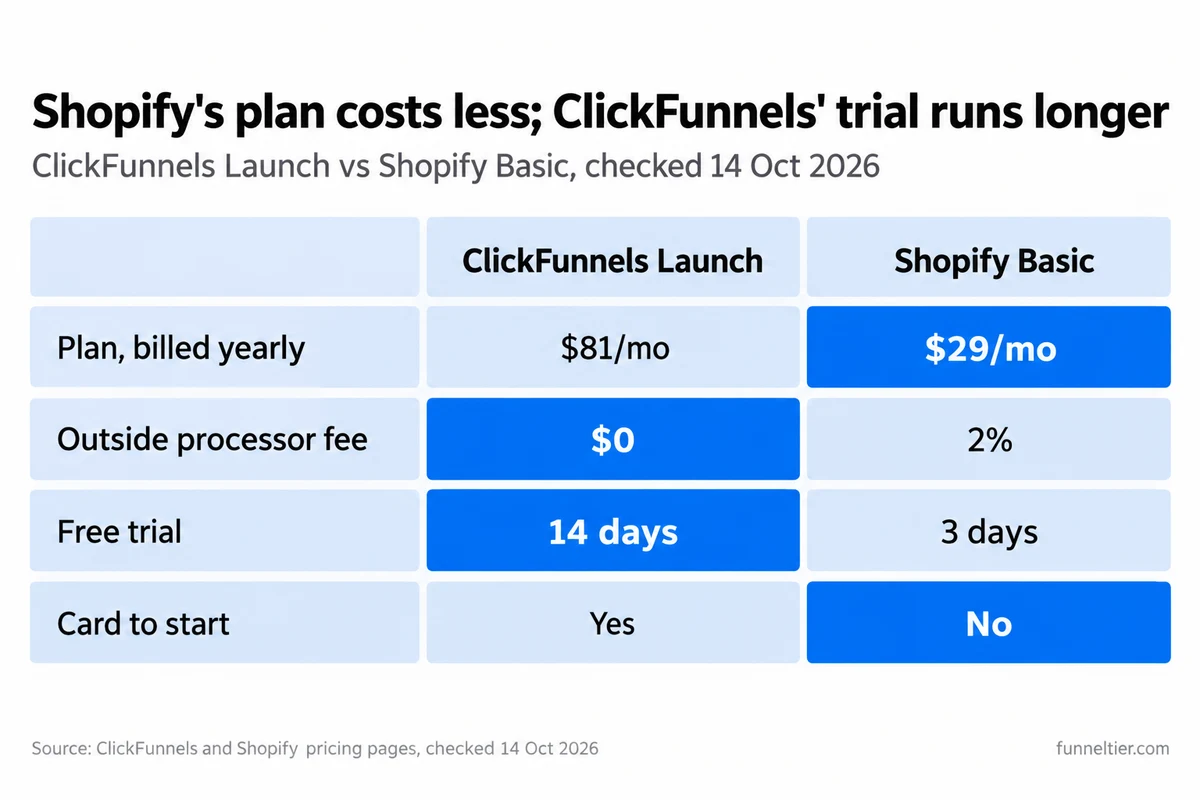
Shopify is cheaper to run and built for catalogues. ClickFunnels costs more per month but includes the email, CRM, bumps and one-click upsells that a Shopify store typically adds through apps. Checked 14 October 2026:
| ClickFunnels | Shopify | |
|---|---|---|
| Entry plan, billed yearly | Launch, ≈ $81/mo ($970/yr) | Basic, $29/mo ($348/yr) |
| Next plan, billed yearly | Scale, ≈ $164/mo | Grow, $79/mo |
| Fee with an outside processor | $0 on direct Stripe (+1% via Payments AI) | 2% Basic · 1% Grow · 0.6% Advanced |
| Free trial | 14 days via our link, card required | 3 days, no card |
| Inventory | Tracked per location | 10 locations on Basic to Advanced |
| Team seats, entry plan | 2 team members | No staff accounts on Basic |
| Built in | Email, CRM, bumps, one-click upsells | Catalogue store, apps for extras |
Shopify’s 2% applies when you use a payment provider other than Shopify Payments, whose own rates vary by plan. Shopify also has no setup fees on any plan.
When to pick each
Choosing ClickFunnels for ecommerce over Shopify comes down to how people buy from you: one offer, or a shelf to browse.
Pick ClickFunnels if you sell one hero product or a small range through paid ads, your profit depends on order value, you sell subscriptions or book-plus-course combos, and you want email and CRM in the same account as the checkout.
Pick Shopify if shoppers browse a large catalogue, Google search is your main channel, you sell in person or wholesale, or returns are a big part of your operation.
Selling a hero product? Test ClickFunnels free for 14 days →
Using both together
You can also run both. Shopify stays the catalogue and back office. ClickFunnels becomes the paid-traffic front end for the hero SKU, where the bump and upsell live.
The catch is the join. ClickFunnels has no native Shopify sync that we could find, so you need a third-party route. One example on the Shopify App Store is ClickifyPro for Clickfunnels: $29/month with a 30-day free trial, and it merges the main purchase, bumps, upsells and downsells into one Shopify order. Test it before you rely on it. Zapier is the other route.
On yearly billing, Launch plus Shopify Basic plus that connector comes to about $139 a month in plan fees, before card processing.
How do you test ClickFunnels for your store in the 14-day trial?
Fourteen days is enough to put one physical product through a real ClickFunnels checkout and see real orders.
Pick the plan
Switch to Launch on the checkout if one store is enough.
Build one real product
Tick physical product and "Fulfillment required", add the SKU, weight and tax category, then a shipping profile and direct Stripe.
Add one bump and one upsell
Test each product on its own, since there's no full-store test mode. Ask support about upsells on direct Stripe.
Send real traffic
A small ad budget or your email list. Decide on day 12, before the first charge.
If building pages from scratch slows you down, Build with AI can draft the funnel for you, or look at done-for-you funnel options.
The 14 days apply through our link, and the checkout shows “$0 due today”. Some buttons on ClickFunnels’ own pricing page currently lead to a 7-day version, so check the day count before you enter your card.
The checkout says you can cancel through your dashboard or by email. Cancel before day 14 and you pay nothing. After the first charge, the 30-day money-back guarantee still covers you. Here’s how the free trial and refund window work in detail.
Start your 14-day trial and list your first product →
Frequently asked questions
Is ClickFunnels good for ecommerce?
Yes, for hero-product, bundle and subscription brands that sell through paid traffic and earn on bumps and upsells. ClickFunnels is a poor fit for big catalogues that rely on browsing and SEO, where Shopify does better.
Can you sell physical products on ClickFunnels?
Yes. Tick "This is a physical product" to add weight and country of manufacture, set a SKU and tax category, and switch on "Fulfillment required" to track stock. Each product can have up to 100 variants across three options.
Does ClickFunnels have a shopping cart?
Yes. The Store app includes a storefront, collections, product pages, Add to Cart for multiple products, a cart icon and a checkout. It needs Payments AI or Stripe connected. For one or a few products, the lighter Storefront Funnel works too.
Does ClickFunnels track inventory?
Yes, per location, with On hand, Committed and Available columns and an adjustment history. Bundles don't appear on the Inventory page and imported Zendrop items aren't tracked, so those need watching separately.
Does ClickFunnels calculate shipping and print labels?
Through Shippo or ShipStation it pulls live USPS, UPS and FedEx rates and shows the cheapest at checkout. Labels are created only with Shippo. Flat and free rates work through shipping profiles with no extra app.
Can I use ClickFunnels with Shopify?
Yes, but not natively. We found no built-in sync in the help centre. Third-party connector apps (ClickifyPro is one, at $29/month) or Zapier move ClickFunnels orders, bumps and upsells into Shopify.
Is ClickFunnels better than Shopify?
For a single offer sold through ads, often yes, because bumps, upsells, email and CRM are built in. For a browsable catalogue, no. Shopify's Basic plan costs $29/month billed yearly against $81 for ClickFunnels Launch.
Does ClickFunnels take a percentage of sales?
Not on direct Stripe: ClickFunnels charges nothing extra, though Stripe's own fees apply. Routing Stripe, PayPal, Coinbase or Klarna through Payments AI adds 1%, and Payments AI adds 0.5% on recurring charges.
Can you dropship with ClickFunnels?
Yes. Zendrop plugs in through "Add from Zendrop": ClickFunnels sends paid orders to Zendrop and you pay product and shipping costs. Supliful covers 250+ private-label supplements shipped from the US. Each needs its own subscription.
Which ClickFunnels plan do I need for an online store?
Launch at $97/month if you run one store, since it includes exactly 1. Scale at $197/month covers 5 stores, 75,000 contacts, webhooks and the API. Optimize includes 10 stores and Dominate 20.
The bottom line
Use ClickFunnels for ecommerce when your business is one great product and a well-built checkout: a hero SKU, a bump, a one-click upsell, maybe a subscription. The 2026 store handles physical goods properly, with per-location inventory, live carrier rates and dropshipping. Use Shopify when your business is a catalogue.
Start on Launch at $97/month unless you run more than one store, connect Stripe directly, and do the cost maths for your own order volume. Then spend the 14 days putting one real product in front of real traffic. If the checkout lifts your order value, staying is easy. If it doesn’t, cancel before day 14 and build on Shopify.
Open your ClickFunnels store free for 14 days →
Ready to build your first funnel?
Start with ClickFunnels — the tool we test and recommend — and have a working funnel published today.
Start the 14-day free trial →