Here’s how to use Systeme.io for affiliate marketing in one line: build a free opt-in page, send each new subscriber to a thank-you page with your affiliate link on a button, and let an automated email sequence keep recommending the offer. You can do all of it on the free plan, which needs no card and gives you 2,000 contacts, 3 funnels and unlimited emailing. There are two catches: Systeme.io won’t send your emails until you authenticate a domain you own, and Free gives you one automation rule, one tag and one email campaign, per Systeme.io’s plan table. This guide covers promoting other people’s offers. Running your own affiliate program and referring Systeme.io itself are separate things, covered briefly near the end. Everything here was checked on 9 October 2026.
We may earn a commission if you sign up through links on this page, at no extra cost to you. This does not affect our ratings. See how we test.
Start your affiliate funnel on Systeme.io’s free plan, no card →
What do you need before you start?
Four things, and the account is the easiest of them.
An offer to promote. Get it from an affiliate network or a vendor’s own affiliate program, and copy your tracking link from there. Systeme.io builds your pages and sends your emails. It isn’t where your offers come from. Check the offer against its terms too: they prohibit content related to “pornography, gambling, illegal products, violence, exploitation” or fraud.
A lead magnet. A checklist, short guide or video that solves one small problem connected to the offer. Email attachments are capped at 5 MB, so host the file and link to it, or put the download on your thank-you page.
A domain name. Most guides skip this one. Systeme.io’s help centre says: “Authentication of a domain name is mandatory to send emails from systeme.io.” Gmail hasn’t been allowed as a sender since 16 July 2024, and Yahoo is blocked by its own DMARC policy. So the free plan costs $0, plus whatever a domain name costs at your registrar.
A free account. No card, no expiry. That’s Step 1 below.
How does a Systeme.io affiliate funnel work?
A Systeme.io affiliate funnel has four parts, and the last one does most of the selling:
- Traffic. A blog post, social post or video points people to your opt-in page.
- Opt-in page. It names the reader’s problem, offers the lead magnet and collects an email.
- Thank-you page. It delivers the lead magnet and carries one button to your affiliate link.
- Email sequence. A handful of emails keep teaching and recommending, each pointing back to your own pages.
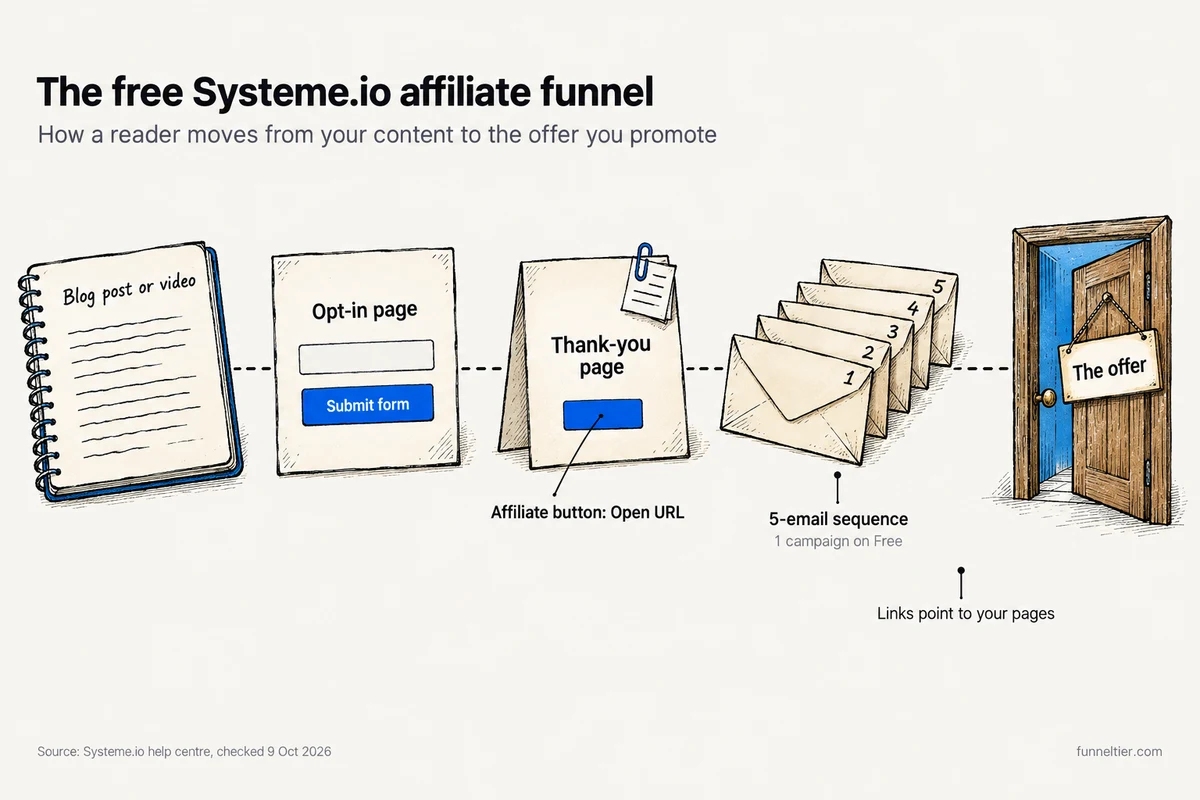
A “bridge page” is any page that sits between your traffic and the merchant’s sales page and warms the reader up first. A Build an Audience funnel gives you an opt-in page plus a thank-you page, so your bridge collects emails. A Custom funnel starts as “a blank canvas”, which suits a form-less bridge.
Build the version with a form. A visitor who leaves without buying or subscribing is gone. A subscriber gets five more chances from your sequence, and emailing is unlimited on every plan, Free included.
Most of what ranks for this topic gets the basics wrong:
"Go to the affiliate management section to create links for the products you've chosen"
That section runs your own affiliate program. Links for other people's offers come from the network or vendor.
"Startup costs $27 a month"
Startup is $17 a month on the pricing page, checked 9 October 2026.
"Capture the email, then redirect straight to the offer"
The redirect exists, but a thank-you-page button is the safer default (Step 5).
How to use Systeme.io for affiliate marketing, step by step
Steps 1 to 7 build the core funnel. Step 8 adds a blog and is optional.
Step 1: Open a free account and set your subdomain
Sign up for Systeme.io’s free plan with your email address. No card is asked for. Every account gets a yourname.systeme.io subdomain, and your pages work on it straight away. To rename it, go to Settings → Custom domains, open the ⋯ menu and choose “Edit subdomain name”.
Claim your free Systeme.io subdomain and 2,000-contact plan →
Step 2: Connect your domain and authenticate email
The free plan includes 1 custom domain. Email authentication lives elsewhere: Profile settings → Emails → Domains, where you’ll get 3 CNAME records and 1 DMARC (TXT) record to add at your registrar.
Two rules trip people up. First, “The domain you want to authenticate must have an active website linked to it”, and a domain showing a 404 can get your emails blocked. Our reading: pointing the domain at your Systeme.io funnel or blog gives it that live page. Second, a domain can be authenticated in only one Systeme.io account.
Systeme.io also offers to “connect your custom domain for you for free”, but you have to hand support your registrar login. If you use it, set a temporary password and change it afterwards.
Step 3: Create a “Build an Audience” funnel
Go to Sites → Sales funnels → Create. Enter a name, domain and currency, then choose Build an Audience. Systeme.io creates an Opt-in page and a Thank you page for you. Pick a template or start blank.
Per Systeme.io’s plan table, Free allows 3 funnels and 15 funnel steps in total. This funnel uses 2 of those steps.
Step 4: Write the opt-in (bridge) page
Keep it short: a headline about the reader’s problem, three bullets on what the lead magnet gets them, a few sentences on why you recommend the offer, and one form.
Then the settings that make it work:
- The form needs “at least one Email field”.
- The button’s action must be “Submit form”, or the automation in Step 7 won’t fire.
- Set the redirect to “To the next step” so subscribers land on your thank-you page.
Double opt-in is optional. Contacts must confirm within 24 hours or they’re removed automatically. Turn it on anyway: the list grows a little slower, but every address on it has been confirmed, which matters for your first 500 emails. If the page names the product you promote, add a disclosure line on the page.
Step 5: Put your affiliate link on the thank-you page
Put the lead magnet download at the top. Below it, two or three sentences of recommendation and one button. In the button settings, choose “Open URL” and paste your affiliate link. Put your disclosure right next to it.
Why not use the “To the custom URL” redirect straight to the merchant? Some programs only pay when the reader clicks. Amazon pays nothing on a “Redirecting Link”, one that sends people through an intermediate site “without requiring the customer to click on a link or take some other affirmative action”. A button avoids that, and the lead magnet still gets delivered.
Step 6: Write a 5-email follow-up sequence
Systeme.io calls a sequence a campaign. Create it before the automation, because the rule in Step 7 needs it. The arc we suggest (our template, not the vendor’s):
-
Deliver
The lead magnet link again, plus one quick win from it.
-
Story
The problem you had and what changed. Name the offer once.
-
How-to
Teach one useful thing and link to a deeper post on your domain.
-
Objection
Answer the main hesitation honestly, including who the offer is not for.
-
Recommendation
A direct pitch with one link to your bridge page or review.
Every email should link to a page on your own domain, not a raw or shortened affiliate link (the next section explains why). From Systeme.io’s deliverability good practices: no {{First name}} in subject lines, a visible unsubscribe link, and no all caps or spam words.
Step 7: Wire it up with your one automation rule
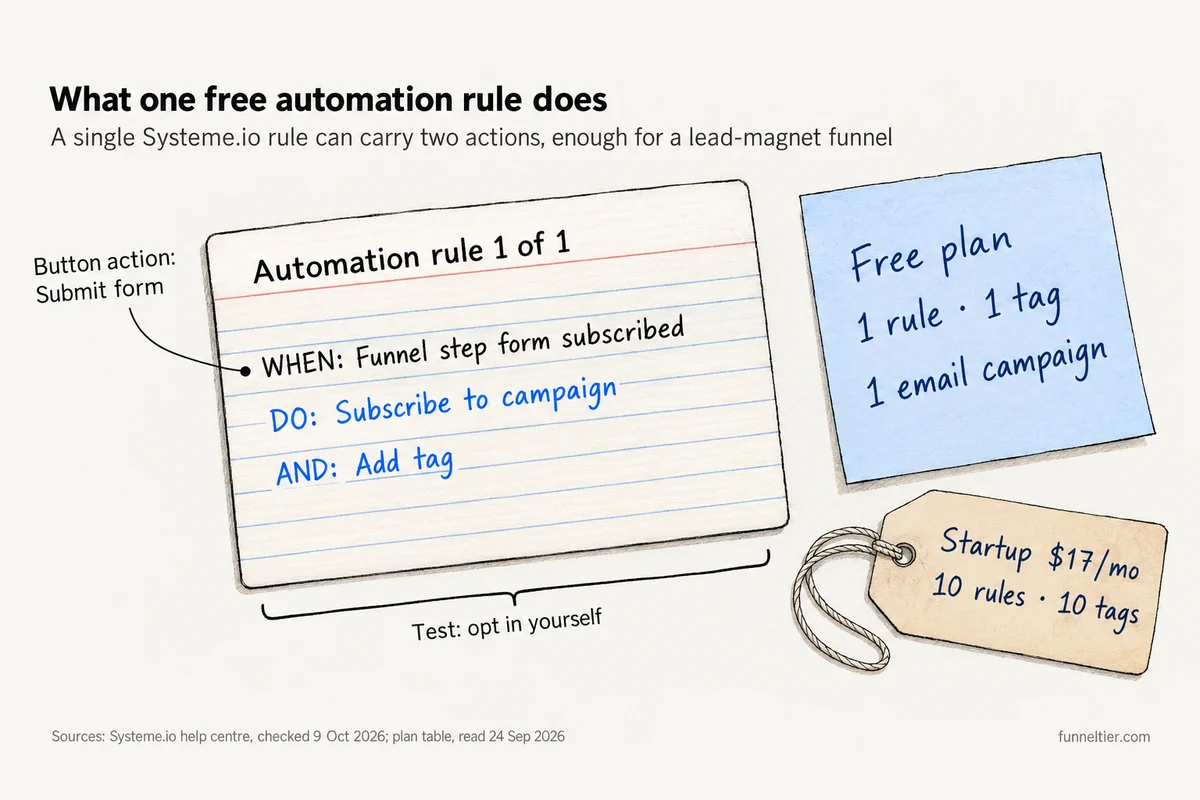
Go to Automations → Rules and create one rule:
- Trigger: “Funnel step form subscribed”, then pick your opt-in page.
- Action 1: “Subscribe to campaign”, then pick your sequence.
- Action 2: “Add tag”, for example a tag named after the lead magnet.
One rule, two jobs. Systeme.io’s help centre confirms a rule can carry more than one action, which is how a single free rule runs a whole lead-magnet funnel.
Then test it. Opt in with a second address of your own, confirm it, check the thank-you page and the button, and make sure email 1 arrives.
Step 8 (optional): Add a blog for free traffic
Go to Sites → Blogs → Create and set the name, domain, URL path and template. An RSS feed is generated automatically. Posts live under the blog’s Posts → Create. Free includes 1 blog, and the pricing page doesn’t state a post limit. Write reviews and how-tos around your offer, link each one to your opt-in page, and disclose inside each post.
Can you put affiliate links in Systeme.io emails?
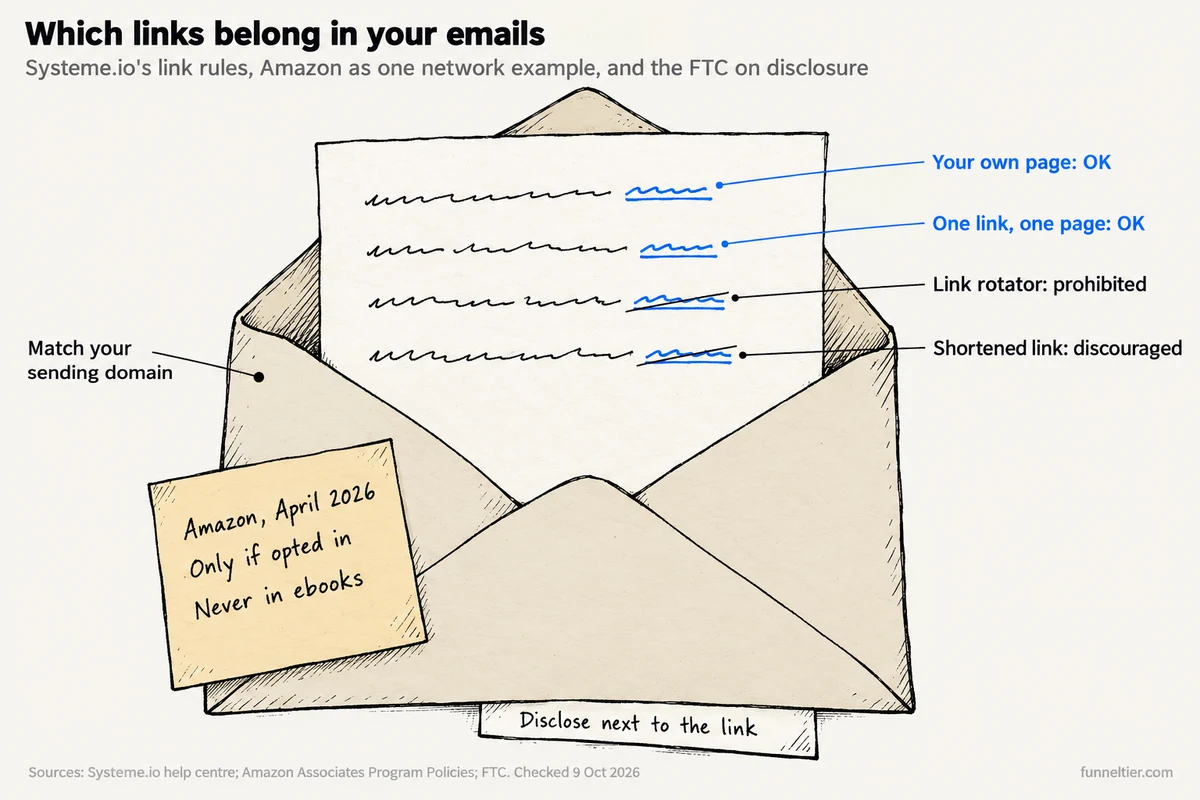
Systeme.io doesn’t ban affiliate links outright, but it has link rules, and so does your affiliate program. Both point to the same setup: your emails link to a page on your own domain, and the affiliate link and disclosure live on that page.
Systeme.io’s own link rules
From the help article “Which links are not allowed in emails sent from systeme.io?”:
- “A link must lead to a single landing page. Changing links that redirect to multiple pages depending on the click are prohibited.” That rules out link rotators.
- Link domains should match your sending domain “for optimal deliverability”. Send from [email protected], link to pages on abc.com.
- Link shorteners such as bit.ly are discouraged, and blacklisted domains can be blocked.
- “If you share links provided by a third party, it is your responsibility to ensure they are safe.”
On top of that, purchased lists are prohibited, and Systeme.io “reserves the right to suspend the email function as well as block the accounts of its users for any behavior likely to harm the efficiency of the service.”
Your affiliate program’s rules (Amazon as one example)
Every network writes its own terms, so read yours. Amazon is a useful example because its email rule changed this year.
Amazon’s Program Policies, updated 14 April 2026, now say: “You may include Special Links in emails, SMS and direct messaging from your social media Sites; provided, that such communications are solicited (i.e., opted into by the receiving customer)…”. The words “from your social media Sites” leave it unclear for a standalone newsletter, so confirm it in your own Associates account.
The rest is clearer. No links in “any printed material, ebook, mailing”, so keep them out of PDF lead magnets. No shortener that “makes it unclear that you are linking to an Amazon Site”. And “As an Amazon Associate I earn from qualifying purchases.” must appear “clearly and prominently”.
The FTC’s disclosure rule
The FTC wants any “financial, employment, personal, or family relationship with a brand” disclosed where it’s “hard to miss”. It says disclosures are likely missed if they appear “only on an ABOUT ME or profile page, at the end of posts or videos, or anywhere that requires a person to click MORE.” So: one plain line next to the affiliate button, and in every email that recommends the offer.
Why do your first 500 Systeme.io emails pause?
New Systeme.io accounts send in batches. Its help centre says your first email goes to 100 contacts, then sending pauses “to analyze the initial statistics” for anything from minutes to 6 hours. The check repeats after each batch of 100 until you reach 500 emails. After that, once the account is more than 16 days old, you’re “classified in a high, medium, or low risk group”.
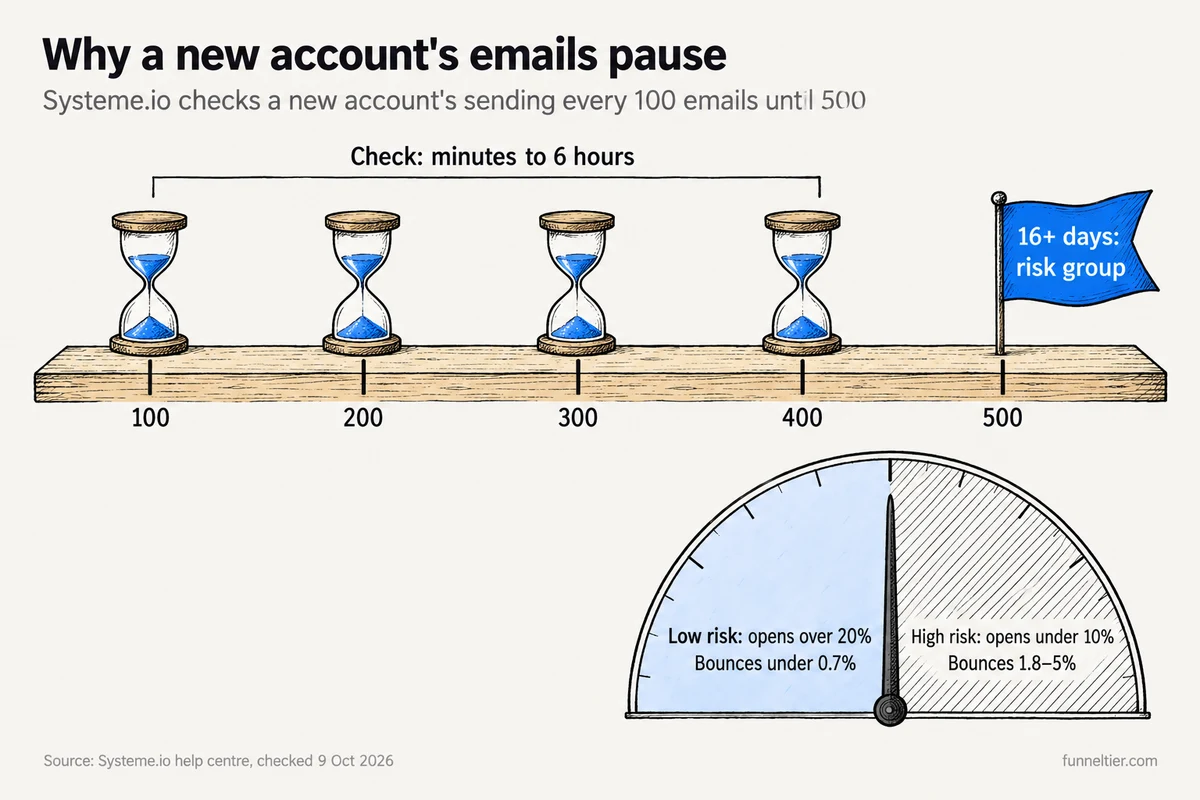
The vendor’s bands: low risk means opens above 20%, spam complaints under 0.25% and bounces under 0.7%. High risk means opens under 10%, spam complaints of 0.4 to 1% and bounces of 1.8 to 5%. Imported contacts and spam-like wording can trigger holds of their own.
So don’t plan a launch-day blast from a new account. Send your first emails to a small list of people who really opted in, remove bounces, and never import a list you didn’t build. Our full Systeme.io review covers why accounts get paused in more detail.
Which free plan limits will an affiliate hit first?
If you use Systeme.io for affiliate marketing on Free, the automation caps bite long before the 2,000-contact cap does.
| Limit (plan table) | Free · $0 | Startup · $17/mo | When you hit it |
|---|---|---|---|
| Automation rules | 1 | 10 | Second lead magnet |
| Tags | 1 | 10 | Segmenting by interest |
| Email campaigns | 1 | More | Second sequence |
| Sales funnels | 3 | 10 | Fourth offer |
| Funnel steps (total) | 15 | 50 | Many small funnels |
Plan-table figures as read on 24 September 2026; the table’s cells didn’t render on 9 October 2026.
The order most affiliates hit them in:
- One rule, one tag, one campaign. One lead magnet with one sequence fits. A second lead magnet with its own sequence doesn’t, and that’s the real upgrade trigger.
- 3 funnels and 15 steps. Room for a few opt-in and thank-you pairs.
- 2,000 contacts. Usually last, since emailing itself is unlimited.
The pricing page also contradicts itself: its FAQ says Startup has “unlimited funnels”, the table says 10. Plan around the lower number.
Paid plans run Startup $17, Webinar $47 and Unlimited $97 a month, with “2 months free” on annual billing. They’re non-refundable, so stay on Free until a cap actually blocks you. Don’t sit over a limit, though: after 3 daily warning emails, the account is restricted on day 4 and “Opt-ins and payments stop working”. Free’s $10,000 lifetime sales cap barely matters here, because the network pays your commissions. For every plan side by side, see the plan-by-plan limits table.
Start on Systeme.io Free and upgrade only when a cap blocks you →
Is ClickFunnels better for affiliate funnels?
For most beginners, no. Systeme.io wins on $0 to start and unlimited emailing. ClickFunnels starts at $97 a month on Launch with a 14-day trial, and makes more sense once you have an offer that converts (our ClickFunnels review). If AI building is the draw, compare ClickFunnels’ AI funnel builder with Systeme.io’s official MCP server, included on every plan. It can create tags, campaigns and automation rules from ChatGPT or Claude, but it can’t edit funnels.
Not the same thing: your own affiliate program vs Systeme.io’s referral program
Search “Systeme.io affiliate” and three different things come back mixed together. This guide covers promoting other people’s offers. The other two:
Running your own affiliate program
This is for when you sell your own product through Systeme.io. Free includes 1 affiliate program, set up in Affiliate Program settings, with no second-tier commission by default and commission you can vary per order form. Affiliates get “lifetime affiliation” and need no subscription. If their traffic lands on an external page first, adding ?sa=AFFILIATEID to links into your Systeme.io pages still credits them.
No product yet? Done-for-you PLR funnels are one shortcut (they run on ClickFunnels, not Systeme.io), and our guide on how to sell PLR products covers the wider route.
Earning from Systeme.io’s referral program
Systeme.io pays “60% of the amount of all sales of systeme.io and our courses”, for life. Your link is any Systeme.io URL plus ?sa=YOURID. Payouts go by PayPal or bank transfer, self-referral is forbidden, and the cookie lasts a year. The funnel you just built works for this too: a lead magnet about starting online, then a thank-you page recommending the tool you used.
Open a free Systeme.io account to build with, or to promote →
Common mistakes to avoid
Most stalled Systeme.io affiliate funnels trace back to one of these:
- Sending from a Gmail address. That hasn’t been allowed since July 2024, so authenticate your own domain first.
- Putting shortened or rotator links in emails. Link to your own pages instead.
- Redirecting straight to the merchant. The reader skips the lead magnet, and some programs don’t pay on redirects.
- Hiding the disclosure in the footer. It belongs next to the link.
- Blasting an imported list on day one. Imports can trigger holds, and new accounts send in batches of 100 anyway.
- Spending your one automation rule on something minor. On Free, that rule is your whole funnel.
- Expecting the platform to hand you offers. Bring your own from a network or a vendor’s program.
- Upgrading early. Paid plans can’t be refunded.
Build your free Systeme.io bridge funnel with unlimited emails →
Frequently asked questions
Can I do affiliate marketing with Systeme.io's free plan?
Yes. Free gives you 2,000 contacts, 3 funnels, 1 blog and unlimited emailing with no card: enough for an opt-in page, a thank-you page with your affiliate button and one sequence. You'll need your own domain to send email.
Can I put affiliate links directly in Systeme.io emails?
They aren't banned outright, but each link must lead to a single landing page, rotators are prohibited, shorteners are discouraged and third-party link safety is on you. Your program may add its own rules. Link to a page on your domain and keep the affiliate link there.
Do I need a domain to use Systeme.io for affiliate marketing?
To send email, yes. Domain authentication is mandatory, Gmail can't be a sender, and the domain needs an active website. Pages can run on the free subdomain.
How do I send subscribers to an affiliate offer after they opt in?
There's a "To the custom URL" redirect, but a thank-you-page button set to "Open URL" is safer. The reader gets the lead magnet first and makes the click, which matters for programs like Amazon that don't pay on redirects.
Does Systeme.io have an affiliate marketplace where I can find products?
Don't build your plan around one. Treat Systeme.io as the tool, and get offers and tracking links from affiliate networks or vendors' own programs.
How many email sequences and automations do I get for free?
Per the plan table, 1 email campaign, 1 automation rule and 1 tag. One rule can carry several actions, so "Subscribe to campaign" plus "Add tag" runs a full lead-magnet funnel.
Why did my Systeme.io emails stop sending?
New accounts send in batches of 100, pausing minutes to 6 hours after each, until 500 emails. Imports and spam-like wording can trigger holds, and unauthenticated domains go to spam.
Can I promote Amazon products with Systeme.io?
On your pages, yes, with Amazon's disclosure line. In email, its April 2026 policy allows links in solicited messages "from your social media Sites", so confirm how that applies in your Associates account. Never in ebooks or PDFs.
The bottom line
Using Systeme.io for affiliate marketing comes down to five moves. Start on the free plan. Authenticate a domain before you write an email. Build one Build an Audience funnel with the affiliate button on the thank-you page. Spend your single rule on opt-in → sequence → tag. Then let a small, real list warm up the account before you push volume.
Upgrade to Startup at $17 only when the one-rule ceiling blocks a second lead magnet. Until then, Free does the job.
Start free on Systeme.io: 3 funnels, 2,000 contacts, $0 →
Ready to build your first funnel?
Start with ClickFunnels — the tool we test and recommend — and have a working funnel published today.
Start the 14-day free trial →