The ClickFunnels refund policy is a 30-day money-back guarantee that starts on your first payment, not on the day you sign up. On the 14-day trial, that payment is the charge when the trial ends, so your deadline is day 44 at the latest. On the $99 offer, which has no trial, the 30 days start the day you pay. To claim, email ClickFunnels support from your account email with the subject “Refund Request”; the help centre says refunds take 3 to 10 days. Once the 30 days are up, the terms of service say “All sales are deemed final”, monthly fees aren’t prorated, and an annual plan cancelled early gets credit, not cash.
Checked against ClickFunnels’ terms of service (last updated 18 January 2026), pricing page, $99 offer page and help centre, 20 October 2026.
We may earn a commission if you sign up through links on this page, at no extra cost to you. This does not affect our ratings. See how we test.
Get 3 months of Scale for $99 →
Does ClickFunnels give refunds?
Yes. The pricing page FAQ asks “Is there a 30-day money back guarantee?” and answers: “Yes, we have a 30-day money back guarantee.” If you decide you don’t want to be a member, it goes on, “we’ll happily cancel your account during that window of time without any penalties or fees.”
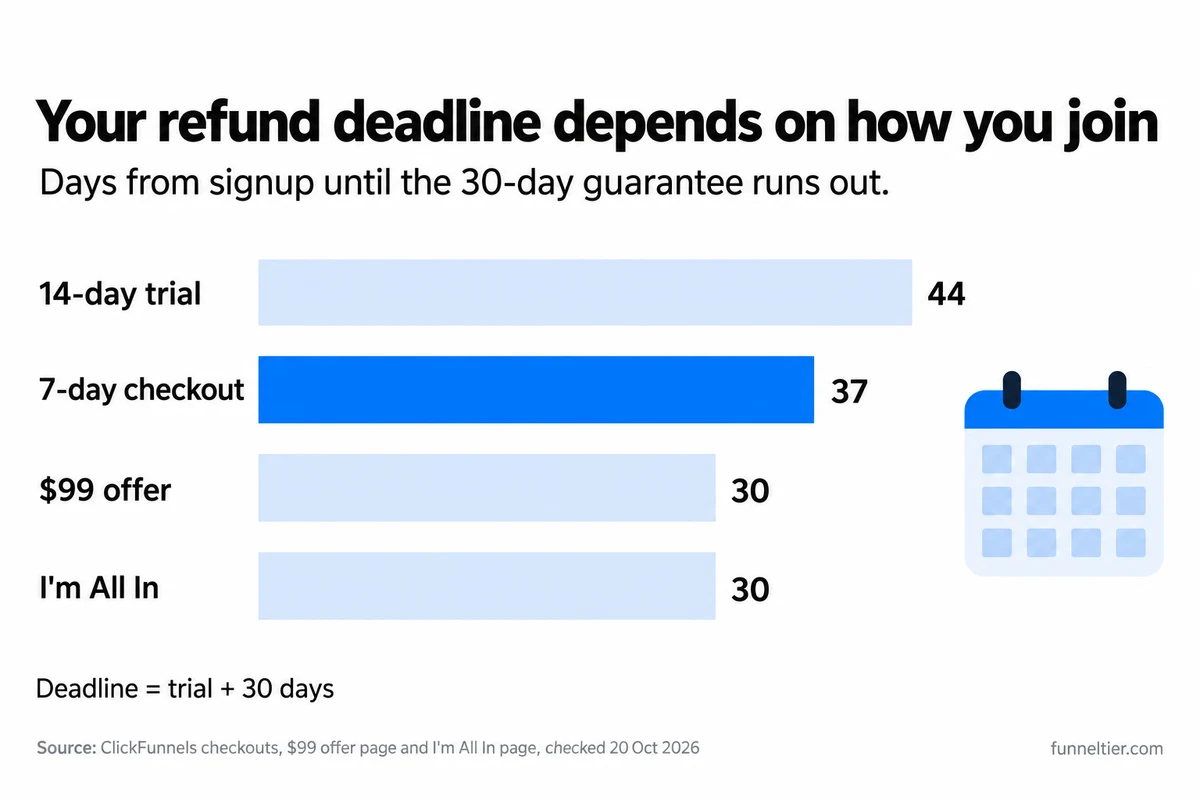
The clock starts when you pay. The help centre tells you to “reach out to us within 30 days of your purchase”. On the ClickFunnels 14-day trial, the purchase is the first charge when the trial ends, which is why the pricing page talks about trying ClickFunnels “risk-free for a total of 44 days (14-day free trial + 30-day money-back guarantee after your trial ends)”. For cancelling before you’re charged at all, read how the 14-day trial and 30-day guarantee fit together.
Most guides skip this part: the guarantee isn’t in the terms of service, which make every sale final outside hard goods (more on that below). The 30-day promise appears on the pricing page, the checkouts, the offer pages and the help centre instead, so screenshot the guarantee line on the checkout the day you pay.
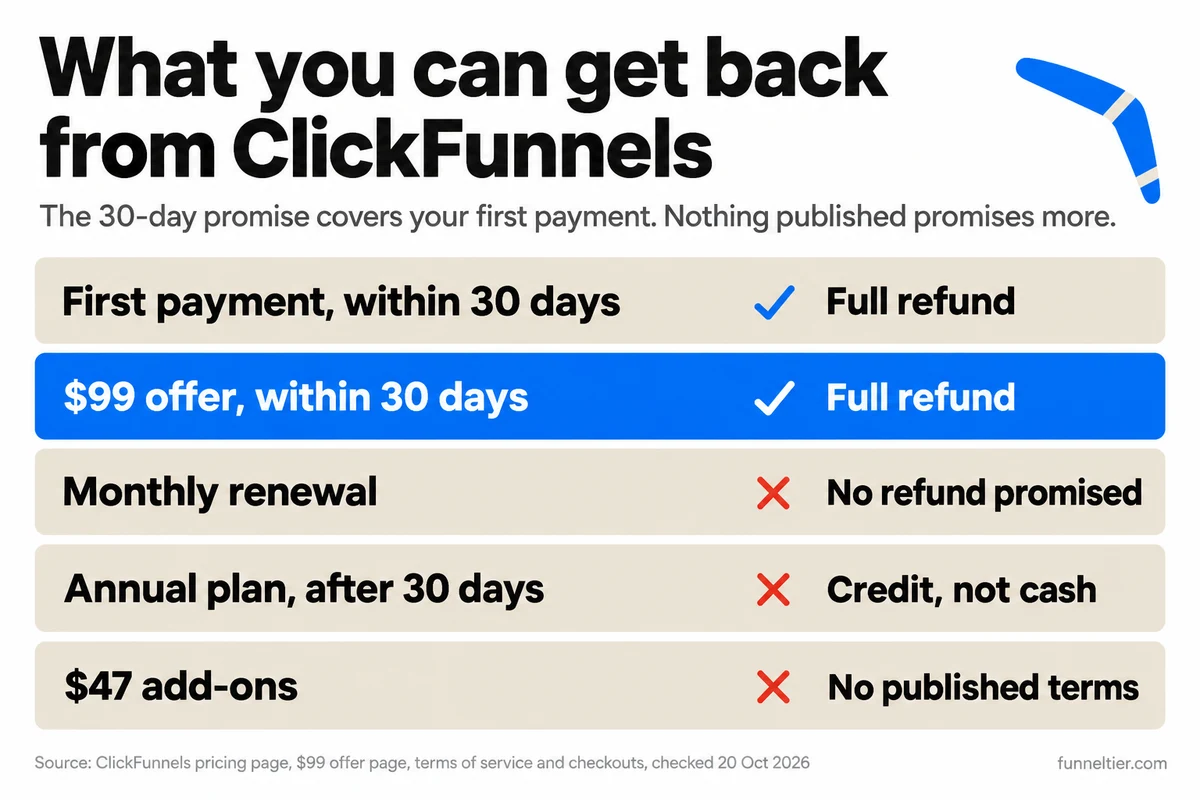
In short, your first payment is refundable for 30 days whichever way you join. Nothing published promises cash back on renewals or on annual plans past the window, and the $47 add-ons have no published refund terms at all.
What does the ClickFunnels refund policy cover, by purchase type?
You can start paying ClickFunnels in several ways, and the ClickFunnels refund policy gives each one a different deadline. Plan prices are in full plan-by-plan pricing.
| How you bought | What you pay and when | Refund deadline | After the deadline |
|---|---|---|---|
| 14-day trial, cancelled in time | $0, card on file. Cancel 24+ hours before the trial ends | Nothing charged, nothing to refund | n/a |
| First charge after the 14-day trial | $97 Launch or $197 Scale on day 14 | Day 44 | No refund, no proration |
| First charge after a 7-day checkout | $97 Launch on day 7 | Day 37 | No refund, no proration |
| Monthly renewals | $97, $197 or $297 each month | No published refund promise | Cancel 10+ days before renewal |
| Annual plan | $970, $1,970, $2,970 or $5,997 up front | Guarantee advertised for all plans; confirm in writing | Credit toward other ClickFunnels services, not cash |
| $99 offer (3 months of Scale) | $99 on day 1, no trial | Day 30 | $197/mo plus tax from month 4 |
| I'm All In | $1,970 on day 1 | Count day 30 from payment | Annual credit rule |
| One Funnel Away | $0 to join; Launch free for 14 days, then $97/mo | Day 44, as the 14-day trial | The $47 Fill Your Funnel bump: no published refund terms |
| $47 template bump | $47 billed today at the trial checkout | No published refund terms | Treat the $47 as spent |
Last verified: 20 October 2026.
Four rows need more explanation.
Annual plans. The $99 offer page says “All plans include our 30-day money-back guarantee”, and no page we found excludes annual billing. No page says outright that an annual plan cancelled in its first 30 days gets cash back, either. The guarantee is advertised for all plans; the terms’ credit rule is for cancelling before the end of the year. Get the answer in writing from support before you pay a year up front.
I’m All In. The checkout charges “Today: $1,970” for 12 months of Scale plus four training products, including Funnel Builder Secrets. Its guarantee line reads “For 30 days after trial ends”, but the page shows no trial, so count 30 days from the day you pay. It can only be bought once per account. More in I’m All In: a year of Scale plus training.
One Funnel Away. The guarantee comes with a condition: “if you participate in the challenge, show up to the training and implement what you learn”. Then “you can email our support team within 30 days and we’ll cancel your ClickFunnels membership with zero hassle”, and the FAQ adds “we’ll return your initial investment without hassle.” The page doesn’t say whether the $47 bump counts as “initial investment”. We found no published refund terms for it, so treat the $47 as spent. Details in what the One Funnel Away guarantee actually promises.
The $47 template bump. On the trial checkout it reads “YES! I want 20+ Professionally done for me Funnels + Graphics packs”. It’s billed today while the plan itself costs $0 today, and we found no published refund terms for it. Tick it only if you’d pay $47 for the templates even if you leave.
Start Scale for $99 with the 30-day guarantee →
Check the day count before you enter a card
Some ClickFunnels checkouts offer 7 days, not 14. The 7-day checkout says “7 days free from today, then just $97/month (plus applicable taxes)” and “30-day money back GUARANTEE after your trial ends”. The plan buttons on the pricing page just say “Start Free Trial”, with no length.
That moves your deadline. A 14-day checkout gives you 14 + 30 = day 44; a 7-day checkout gives you 7 + 30 = day 37. Both take a card and show “$0 due today”, so a day-44 reminder on a 7-day trial misses the refund by a week.
Our trial link opens the 14-day checkout: “14 days free from today, then just $197/month (plus applicable taxes)”, with Launch offered at $97 a month instead.
Start the 14-day trial, refund deadline day 44 →
Can you get a refund on the ClickFunnels $99 offer?
Yes, inside 30 days. The $99 offer is “3 months of ClickFunnels for just $99 (regularly $197/month)” on the Scale plan, a $492 saving. The offer page says “$99 will be charged immediately for your first 3 months”, then “All plans include our 30-day money-back guarantee.” Its FAQ adds: “You can cancel anytime through your dashboard or by emailing support”.
It isn’t a trial, so the guarantee is your only safety net. You have $99 at stake for 30 days and can ask for all of it back inside that window, which is less than the $197 first charge after a Scale trial.
Skip it if you aren’t sure you need ClickFunnels at all; the 14-day trial costs $0 first. It’s also the wrong buy if Launch would do the job, so work out whether you actually need Scale before you pay for it.
Pay $99
Charged immediately. The 30-day guarantee clock starts now.
Last day to ask for a refund
Put it in your calendar the day you pay.
$197/mo starts
Plus applicable taxes, on a recurring basis.
Give notice to leave
The terms want 10 days' notice by email before a renewal.
Try 3 months of Scale for $99, refundable for 30 days →
Month 4 and beyond
From month 4 you pay $197 a month plus tax. Nothing published promises a refund on renewals, so cancel at least 10 days before the renewal date. Year one on this path costs $99 + 9 × $197 = $1,872 before tax. For how that compares with annual billing and the trial, see every real way to pay less for ClickFunnels.
A refund doesn’t make you a new customer again
The $99 offer is “available for new customers only”. The terms say free trials are “only available to new subscribers of ClickFunnels” and exclude previous subscribers and “those subscribers who have already benefited from a free trial”. Refund the $99 and you shouldn’t plan on taking the free trial next. Use the trial first and the $99 offer isn’t meant for you either.
Pick one path and decide inside its window. The offer page shows no end date, only “This is a limited-time offer and won’t be available for long.” Here’s why waiting for Black Friday doesn’t beat the $99 deal.
What do ClickFunnels’ terms of service say about refunds?
The terms, last updated on 18 January 2026, don’t read the way the sales pages do, including the page for the $99 Scale offer.
"30-day money back guarantee"
No guarantee in the terms. "All sales are deemed final except as provided in Section 6", which covers hard goods.
"Cancel anytime, hassle-free"
"At least ten (10) days' notice of cancellation by email" for monthly and annual plans.
"Without any penalties or fees"
"May charge a cancellation fee equal to the amount the subscription was discounted."
"All plans include our 30-day money-back guarantee"
Annual plans cancelled early get a credit, not a refund.
“All sales are deemed final”
Section 10 says “All sales are deemed final except as provided in Section 6 of these Terms”, and Section 6 covers hard goods refunds requested “within thirty (30) days of your purchase”. A software subscription isn’t a hard good, which is why the screenshot matters.
The 10-day notice rule
“For monthly subscriptions (including subscriptions for services), we require at least ten (10) days’ notice of cancellation by email.” Give less and you may still be charged for the next month. You can’t “prorate your last month’s use”, “nor will you be entitled to any refund for any payments to ClickFunnels”. Annual plans need the same 10 days’ notice. The checkouts say you can cancel anytime, but give 10 days anyway.
Annual plans: credit, not cash
Cancel an annual plan before the year is up and “you will not be entitled to a refund but we will provide you with a credit towards other ClickFunnels’ subscription services”. How the guarantee applies inside the first 30 days is less clear, so ask support in writing before you pay a year up front.
The cancellation-fee clause
Section 7, right after the annual-plan sentences, says this word for word:
Compare that with the pricing FAQ, which promises cancellation “without any penalties or fees” during the guarantee window, and with the $99 offer page, which doesn’t mention a cancellation fee at all. We can’t tell you whether or when the clause is applied. Read Section 7 of the terms before you buy any discounted plan, and keep a copy of the guarantee wording you bought under.
How do you request a ClickFunnels refund?
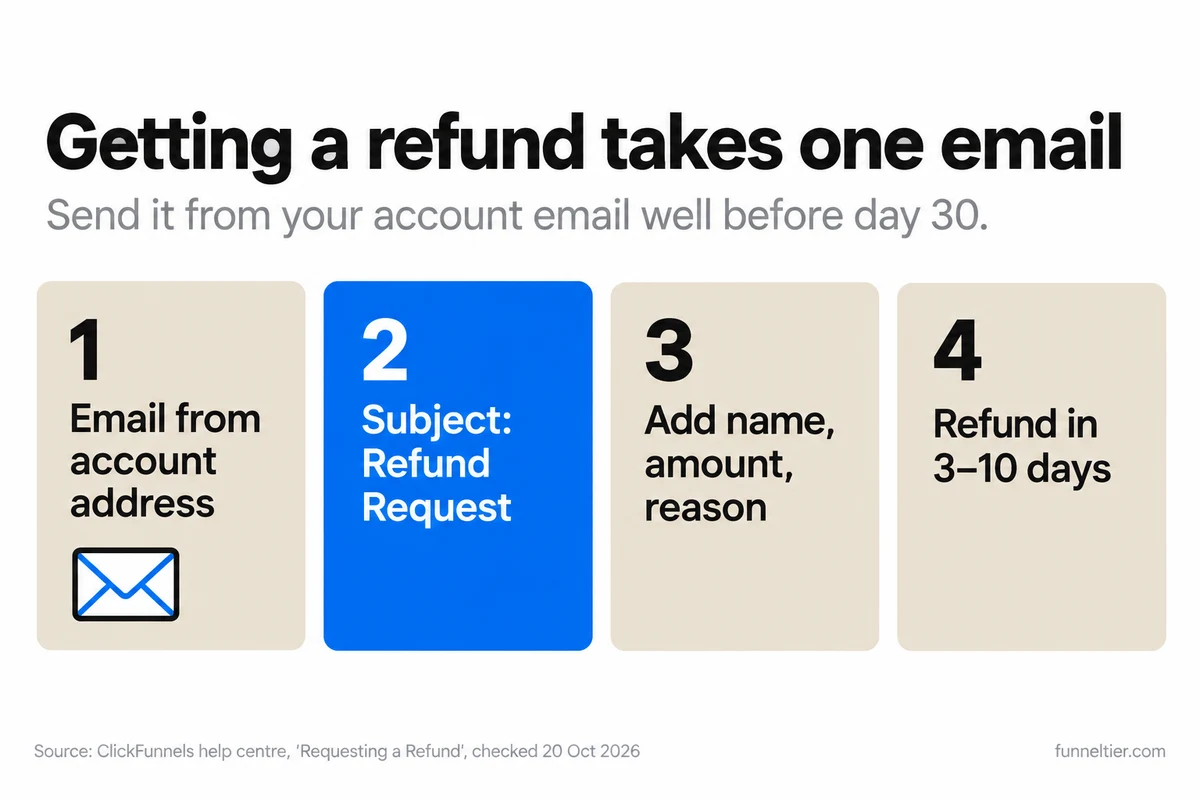
With one email. The help centre’s article on requesting a refund gives this process for current ClickFunnels accounts:
-
Write from your account email
Email ClickFunnels support from the address on your account.
-
Use the subject "Refund Request"
That exact subject line, as the help centre asks.
-
Include the details
Full name, purchase email, the product, the amount charged and a short reason.
-
Writing from another address?
Attach an invoice or a screenshot of your receipt, or give your full name, purchase email, and your card's last 4 digits and expiry date.
-
Wait 3 to 10 days
Your bank sets the final timing.
The article says “Refunds traditionally require 3-10 days to be processed into your account”, and its FAQ says “Once approved, refunds are processed within 10 business days.” Allow up to two working weeks, and send the email well before day 30.
Missed the window? The FAQ on refunds after 30 days says “We recognize that extenuating circumstances can occur, so we invite you to contact us”. That’s an invitation to explain, not a promise of money. The same article says refunds are “subject to the Terms of Service applicable to the product or service you have purchased”, and after 30 days the terms make the sale final.
If you need to keep pages, contacts or course content, ask support what happens to them before you request a refund, and back everything up first.
Cancelling vs getting a refund: do you need both?
Yes. Cancelling stops future charges, and the refund email gets money back. The help centre’s article on cancelling an account doesn’t mention refunds at all, so cancelling alone won’t return anything. Inside the 30 days, do both.
You cancel inside your account. Open Workspace Settings, then Billing, which opens the ClickFunnels Customer Center in a new tab. On the Subscriptions tab, open the three-dot menu, choose Manage Subscription, then Cancel Subscription. Give a reason, click Continue, choose Cancel My Account, confirm with the button that reads “Cancel My Account & Delete All My Content”, give a reason again and submit.
The help centre warns that “Clicking Cancel Subscription does not immediately cancel your subscription” and “The cancellation will not be effective until the final confirmation is submitted.” You’re done only when your plan shows “Canceled Effective” and a date. Screenshot that too.
Before you press the last button:
- Back up or export your pages. “Canceling your account will deactivate any active funnels.”
- Cancel any subscriptions you sell to your own buyers first. “Otherwise, they will continue to be charged.”
- Withdraw your Payments AI funds, because afterwards “You will not be able to log in to your Payments AI account”.
- Finish all of that before the final button, which says “Delete All My Content”.
On a trial, the terms promise a reminder at least 7 days before the charge; set your own anyway. The rest of the trial side is in the 14-day trial guide. If you’re moving to something cheaper, start with the free ClickFunnels alternatives.
Can you pause ClickFunnels instead of cancelling?
Yes, for a fee. The help centre says “A nominal fee of $17/month is associated with the Pause plan”. It takes effect “at the conclusion of your current billing cycle” and “covers the storage of all your funnels, courses, and integrations until you choose to return”. To come back, you upgrade to a plan.
The catch: “You will not be able to access any information or build funnels” while paused. Your work is kept, but you can’t touch it.
Pausing costs $80 a month less than Launch at $97, and twelve months paused costs $204. It suits a planned break when you’ll come back to the same funnels. It doesn’t suit a slow month when you still need to build, and if you’re not coming back, it’s money wasted.
How do you refund your own customers in ClickFunnels?
Some people searching “clickfunnels refund” are merchants who need to refund a buyer. If you take payments through Payments AI, open the Transactions tab, open the transaction, click “Make a Refund” and confirm in the side panel. The Payments AI docs say “it can take up to 10 business days from the date of the refund for it to reflect in the customer’s account”, so tell your buyer that up front. There’s also a partial-refund option if you only need to return part of a payment.
How do ClickFunnels’ refund terms compare?
Of the three, only ClickFunnels has a refund window. GoHighLevel’s terms say all fees are non-refundable; see GoHighLevel’s no-refund terms. Systeme.io says: “Please note that our subscription plans are not refundable.” That’s from Systeme.io, which doesn’t refund paid plans.
That window is a real advantage for ClickFunnels’ $99 offer and its trial if you have an offer to sell and want to find out fast whether ClickFunnels fits. It won’t help someone who signs up, gets busy and remembers on day 45. If that sounds like you, set the reminder before you finish checkout, or don’t buy yet.
Test Scale for 30 days with $99 at stake →
Frequently asked questions
Does ClickFunnels give refunds?
Yes, within 30 days of your first payment. The guarantee is on the pricing page, checkouts and offer pages. After that, the terms say "All sales are deemed final".
How long is the ClickFunnels money-back guarantee, and when does it start?
30 days from your first payment: day 44 on the 14-day trial, day 37 on a 7-day checkout, and day 30 on the $99 offer.
Can I get a refund on the ClickFunnels $99 offer?
Yes, within 30 days of paying. The offer page says "All plans include our 30-day money-back guarantee." There's no trial, and from month 4 it renews at $197 a month plus tax.
How do I request a refund from ClickFunnels, and how long does it take?
Email ClickFunnels support from your account email with the subject "Refund Request", with your name, purchase email, product, amount and a short reason. The help centre says 3 to 10 days, and approved refunds are processed within 10 business days.
Can I get a refund after 30 days?
Don't count on it. The help centre "invite[s]" you to get in touch if there are extenuating circumstances, but that isn't a promise. The terms say sales are final and monthly fees aren't prorated.
Do annual ClickFunnels plans get refunded if I cancel early?
After the guarantee window, no: the terms give "a credit towards other ClickFunnels' subscription services" instead of cash. No page says outright how the guarantee applies to annual billing, so get the answer in writing from support before you pay a year up front.
How do I cancel my ClickFunnels subscription?
Workspace Settings, then Billing, then the Subscriptions tab in the Customer Center, then Manage Subscription and Cancel Subscription. Finish every step until the plan shows "Canceled Effective" and a date, at least 10 days before a renewal.
Will I be charged a cancellation fee?
The terms say ClickFunnels "in its sole discretion may charge a cancellation fee equal to the amount the subscription was discounted", without defining which discounts. The pricing FAQ promises "without any penalties or fees" during the guarantee window, and the $99 offer page doesn't mention a fee.
What happens to my funnels when I cancel?
They're deactivated, and the final button reads "Cancel My Account & Delete All My Content". Back up first, withdraw Payments AI funds, and cancel your own customers' subscriptions or they'll keep being charged.
Are the $47 add-ons refundable?
We found no published refund terms for the $47 template bump on the trial checkout or the $47 Fill Your Funnel bump on One Funnel Away. Treat the $47 as spent.
The bottom line
The ClickFunnels refund policy is more generous than GoHighLevel’s or Systeme.io’s, but the clock is short and the promise is written around your first payment. Once those 30 days pass, the terms take over: sales are final, monthly fees aren’t prorated, and an annual plan cancelled early turns into credit.
If you know you need Scale but aren’t sure ClickFunnels will work for you, the $99 route caps your risk at $99 for 30 days. Put day 30 in your calendar on the day you pay. If you’re unsure whether you need ClickFunnels at all, the 14-day trial costs $0 first. Either way, screenshot the guarantee, give 10 days’ notice before any renewal, and read our full ClickFunnels review if you’re still deciding.
Open the $99 Scale offer, 30-day guarantee included →
Start the 14-day free trial instead →
Ready to build your first funnel?
Start with ClickFunnels — the tool we test and recommend — and have a working funnel published today.
Start the 14-day free trial →