ClickFunnels templates are built into ClickFunnels (the product once called 2.0): open Funnels, click Create Funnel and preview a template before you pick it. That works on any plan and during the 14-day free trial. There is no free plan, so “free” means the trial, and the trial needs a card and bills $97/mo (Launch) or $197/mo (Scale) after day 14. Extra templates arrive as share links you install into your account. Classic funnels can’t be shared into the current ClickFunnels, and paid Marketplace templates can’t be bought right now: checkout said “temporarily unavailable” when we checked on 20 October 2026.
We may earn a commission if you sign up through links on this page, at no extra cost to you. This does not affect our ratings. See how we test.
Browse the ClickFunnels template library on the 14-day trial →
Are ClickFunnels templates free?
Yes, once you are inside an account. The template library in ClickFunnels costs nothing on top of your plan, and ClickFunnels doesn’t restrict templates by plan anywhere we could find. The only requirement ClickFunnels’ help centre lists for creating a funnel from a template is “an active ClickFunnels account”.
The catch is the account. ClickFunnels has no free plan: the pricing page lists four paid plans and a “Start Free Trial” button, and no free tier. So a “free” template is one you use during the 14-day trial or on a paid plan.
The trial needs a card. Step 2 of the checkout has a Payment Information section and shows “$0 due today”, and the card is there so billing starts automatically after day 14. If a page tells you that you can grab ClickFunnels templates without a card, it is wrong, and the search results for this topic are full of pages that say exactly that:
"ClickFunnels has a free plan with 3 funnels"
ClickFunnels has no free plan. Those limits match Systeme.io's Free plan.
"No credit card needed"
A card is required at signup, with $0 due today.
"Download free templates"
Current ClickFunnels installs templates through share links, not files.
"Buy any template on the Marketplace"
Paid checkout said "temporarily unavailable" on 20 Oct 2026.
A free plan with three sales funnels, 15 steps and one blog is Systeme.io’s Free plan, which also gives you 2,000 contacts and one course with no card required. See Systeme.io’s free plan limits if that is what you were actually looking for, or our list of free ClickFunnels alternatives.
What a “free” template really costs in year one
The template is $0. The software around it is not. Prices from the ClickFunnels pricing page, checked 20 October 2026:
| What you pay for | Billing | Year one |
|---|---|---|
| The template itself | Included | $0 |
| Launch plan | Annual ($81/mo) | $970 |
| Launch plan | Monthly ($97/mo) | $1,164 |
| Scale plan | Annual ($164/mo) | $1,970 |
| Scale plan | Monthly ($197/mo) | $2,364 |
If you change your mind after paying, the checkout promises a “30-day money back GUARANTEE after your trial ends”, so you get 14 free days plus 30 refundable ones. We explain how the 14-day trial and refund window work in a separate guide.
Start the ClickFunnels 14-day free trial (card required) →
Where do ClickFunnels templates come from in 2026?
There are four places, and most guides blur them together. We checked each one on 20 October 2026 against the help centre, the Marketplace and the checkout. The built-in library and share links are where most people should start.
The built-in template library
This is the main source, and most guides forget to mention it. In ClickFunnels, click Funnels in the left menu, then “Create Funnel”. You get a library of templates you can preview before choosing. Click “Preview Template” to look through the pages, “Select Funnel” to pick one, and “Customize Now” to open it in the Funnel Editor.
The same screen offers two other routes: “Start from Scratch” and “Build with AI”. Build with AI has two modes, Quick and Research, and team members need the “AI User” role to use it. We cover how Build with AI drafts a funnel in its own post.
The library is also where the Marketplace now sends people. Free Marketplace listings carry a notice that free templates are available “inside your account under Funnels → + New Funnel.”
Share funnel links
A share link is a URL that copies someone’s funnel into your account. Sellers, bloggers, course creators and ClickFunnels itself hand out templates this way. In July 2026 the ClickFunnels blog published 53 marketing funnel templates as share links, with the line “install any template on this page straight into your account”.
Before you click one, know this. Share links can carry the sharer’s affiliate code (it is one of the fields when a link is generated), which is one reason so many sites give templates away. And the funnel has to come from the current ClickFunnels. A Classic funnel can’t be shared in, so an old link may simply fail. Some of Russell Brunson’s paid courses bundle share-funnel templates too, which we note in our rundown of his courses.
The ClickFunnels Marketplace
The Marketplace lists 1,478 templates, filterable by “Whole funnels” or “Single page templates” and by 15 categories. On its homepage we counted 13 cards: 2 free funnels from ClickFunnels itself and 11 paid templates priced from $47 to $297.
No ranking page mentions that every paid listing we opened on 20 October 2026 said: “Marketplace checkout is temporarily unavailable, so this template cannot be purchased right now.” There was no explanation and no return date.
When checkout comes back, read the buyer terms before you pay. Purchases are “non-refundable and non-cancellable”. The licence lets you use the template in your own funnels and does not give you the right to sell or sublicense it. Sellers keep 70% of net fees and Etison, which runs the Marketplace, keeps 30%. And no listing we saw said whether a template was built for Classic or for the current ClickFunnels, so ask the seller before buying.
Themes and Frameworks
Themes are templates for your website pages rather than for funnels. You install one from Workspace Settings: Themes, then “Add New Theme”, then “Theme Marketplace”, then Install. ClickFunnels says each theme “includes pre-set page templates, such as a Home Page, Product Page, Blog Page, and more.”
A Framework is much bigger. It bundles a whole workspace: funnels, workflows, themes, courses, products, stores, landing pages, email templates and opportunity pipelines. The recipient opens the link, logs in or creates an account, and picks a workspace. One limit: a Framework “can’t be imported into a workspace that already has a store.” Frameworks suit agencies and course sellers handing over a full setup. For a single funnel, a share link is simpler.
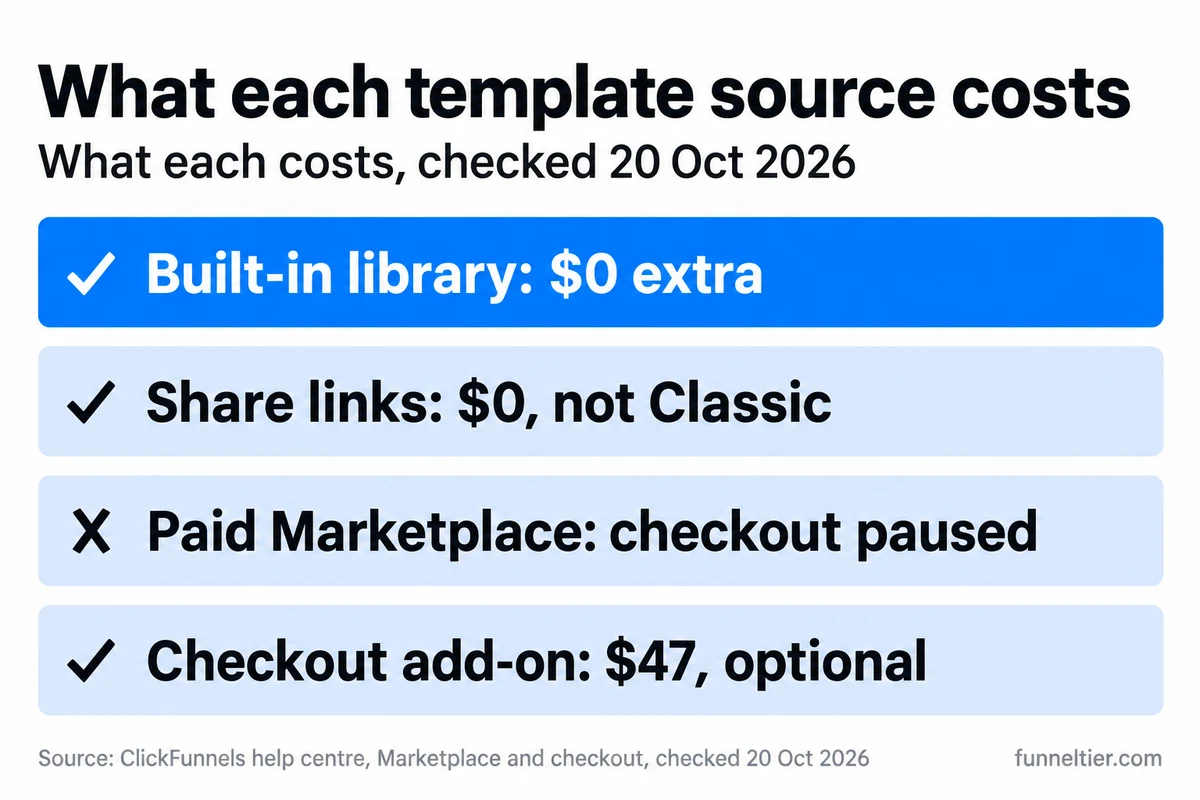
The short version: start with the built-in library, add share links from sources you trust, and treat the Marketplace as paused until its checkout returns.
Preview ClickFunnels’ built-in templates on the free trial →
How do you install or copy a ClickFunnels template?
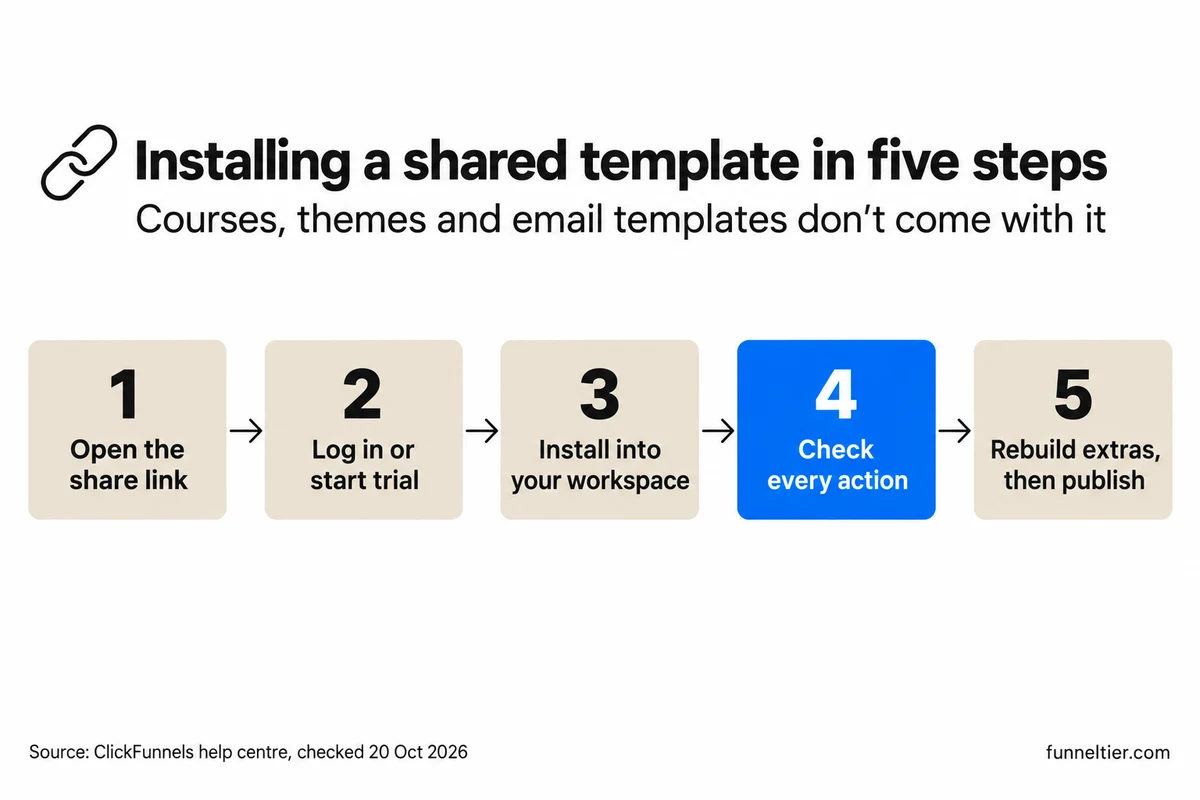
For a share link, it takes five steps. The only stated requirement is an active account, and the trial counts as one.
-
Open the share link
Use a link from a source you trust. A link the sharer has switched off shows a "could not be found" message.
-
Log in or start the trial
The trial needs a card at signup. The plan isn't charged until day 14.
-
Install it into your workspace
The copy is yours. It "becomes independent of the original", so the sharer's later edits never reach you.
-
Check every page and action
The help centre warns that "some actions in the funnel might be lost during sharing". Click through every button and form.
-
Add what didn't come with it, then publish
Rebuild the email templates, theme and any course, connect your domain, and go live.
Step 4 is the one people skip. ClickFunnels is clear that a share link copies the funnel, not your whole setup:
| A share link brings | A share link leaves behind |
|---|---|
| All funnel pages and layouts | Courses |
| Automation workflows | Themes |
| Funnel settings | Email templates |
| Products, if the funnel has them | Some actions, which can drop off in transit |
If you need the courses and email templates too, ask the sharer for a Framework instead.
How to copy your own funnel
Copying a template you have already customised is easier. On the Funnels page, click the “Duplicate Funnel” icon. The copy keeps “all existing steps and settings”, so you can test a second version without touching the first.
How to share a funnel with someone else
Open the funnel’s Settings and choose “Generate a Funnel Share Link”. You fill in a Public Funnel Name, an Affiliate Code, a Public Affiliate Name, whether the recipient can reshare it, and a category (“Generate Leads” or “Sell Products”).
Sharing has limits. A funnel that uses external pages can’t be shared, although custom HTML pages can. And if you edit the funnel later, people who already installed it don’t get the change. You have to click “Republish Funnel” to update the link for future installs.
Do ClickFunnels Classic templates work in ClickFunnels 2.0?
No. Classic templates don’t carry over into the current ClickFunnels. The help centre puts it plainly: “Funnels from ClickFunnels Classic cannot be shared into ClickFunnels (formerly ClickFunnels 2.0) accounts.” That sentence explains most “free ClickFunnels template” links that refuse to install, and why the free-template galleries in the search results disappoint. Most are undated pages full of old share links, none labels which version a link belongs to, and the counts in their headlines don’t add up against the links on the page. Any link that was made in Classic can’t come across, and you can’t tell which ones those are until you try.
The BarnumPT route for Classic pages
If you own Classic pages you want to keep, there is one documented path: BarnumPT, “a suite of tools created by Russell Brunson and Wynter Jones” and separate from ClickFunnels. Its browser extension is free for Chrome, Firefox and Edge, though premium features may need a subscription.
Know its limits before you start:
- “BarnumPT only imports individual pages”, so a funnel moves one page at a time.
- “Products are not included during the migration.”
- Special elements such as Social Share or Survey may not import.
- ClickFunnels “cannot guarantee full compatibility of content, layout structure, colors, fonts, or mobile optimization.”
- You need existing funnel pages in ClickFunnels Classic to start with.
That is fine for three or four pages you are attached to. For anything bigger, rebuilding from a current template or with Build with AI is usually faster than repairing imported layouts.
What about downloaded template files?
Some sites offer templates as ZIP, HTML or other downloads. ClickFunnels’ help centre documents share links, Frameworks and BarnumPT. We found no import-from-file option. If a template only comes as a file, assume you will rebuild it by hand.
| Where the template came from | What to do |
|---|---|
| Built-in library (Create Funnel) | Use it. No extra cost |
| Share link made in current ClickFunnels | Install it, then check the actions |
| Classic funnel or Classic share link | Rebuild, or move pages one at a time with BarnumPT |
| Downloaded file | No import option found. Rebuild it |
| Paid Marketplace listing | Checkout paused on 20 Oct 2026. Wait, and ask the seller which version it is |
What are the best ClickFunnels templates for your goal?
There is no conversion data that ranks individual templates, so we won’t pretend to have a “highest converting” list. What we can give you is our judgement on which funnel type in the ClickFunnels library fits which goal, and what to check in the preview before you commit. Two of the Marketplace’s own categories, “Misc Optin Funnels” (126 listings) and “Misc Sales Funnels” (95), show where a lot of templates sit: list building and selling.
| Your goal | Funnel type to look for | Check before choosing |
|---|---|---|
| Build an email list | Squeeze or opt-in (2 pages) | Mobile preview of the opt-in form |
| Sell a low-priced product | Tripwire or two-step order | Whether the order form and upsell page are both included |
| Sell a course or coaching | VSL or webinar | Number of pages, and whether a replay page comes with it |
| Book sales calls | Application funnel | Whether the form asks the questions you need |
| Recurring content | Membership | That courses aren't part of a share link, so you build them |
| Sell a book | Free-plus-shipping book funnel | Whether shipping fields are on the order page |
Pick by page count before looks. A two-page opt-in does a different job from a five-page webinar funnel, so choose the structure first and change the colours later. Then use Preview Template and look at the phone view before you click Select Funnel, because fixing a broken mobile layout takes longer than choosing a different template. Last, check what follows the form. A template is pages first, and email templates never travel through a share link, so find out whether the follow-up emails come with it.
None of this helps if you are hoping the template will supply the offer. The best ClickFunnels templates still need your product, your price and your copy. If that is the missing piece, read the next section.
Template, Build with AI or a done-for-you funnel?
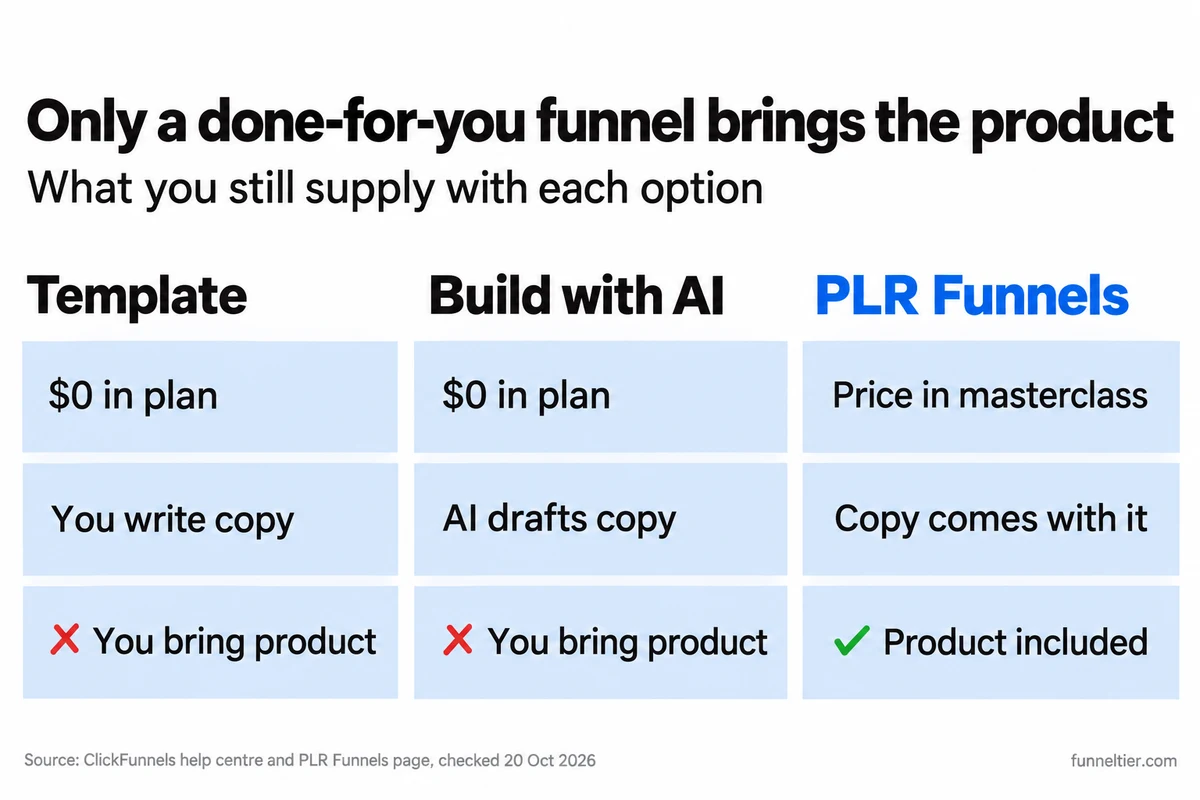
All three put pages in your ClickFunnels account. What differs is how much of the work you still do. A template gives you a layout. Build with AI drafts layout and copy from a description of your business. A done-for-you funnel from PLR Funnels comes with a product to sell.
| Template | Build with AI | PLR Funnels | |
|---|---|---|---|
| Cost | $0 in your plan | $0 in your plan | Shown in the free masterclass ($797 at its 2023 launch) |
| Copy | You write it | Drafted from your description | Part of the 52 funnels its page calls "ready-to-launch" |
| Product | You bring it | You bring it | Included, per our PLR Funnels review |
| Where it runs | Your account | Your account | Plugs into your ClickFunnels account |
Build with AI came out of beta on 18 September 2026 and is on every plan, with the Quick and Research modes mentioned above. It is a faster starting point than a blank template when you know your offer but hate writing copy, though it can’t invent the offer for you. Our post on how Build with AI drafts a funnel covers both modes in detail.
PLR Funnels is a different kind of purchase. Its page offers a free masterclass titled “We’ve Just Built You 52 READY-TO-LAUNCH Funnels”, presented by Russell Brunson, Shreya Banerjee and Paul Counts, and shows the funnels going into “your ClickFunnels account”. The page shows no price. It was $797 at its 2023 launch, and the current price is shown in the masterclass. Our PLR Funnels review goes deeper on whether it is worth that price.
Our verdict:
- Pick a template if you have a product and can write. It costs nothing extra and you stay in control of every word.
- Pick Build with AI if you have a product but want a first draft of the copy in minutes.
- Pick PLR Funnels if what you’re missing is the product rather than the design.
- Skip all three if you have nothing to sell yet, because no template fixes that.
If you are weighing agencies and other paid options as well, our guide to three ways to buy a done-for-you funnel compares them.
Watch the free PLR Funnels masterclass and see the price →
Try a template or Build with AI on the ClickFunnels trial →
How to test ClickFunnels templates on the 14-day trial
Fourteen days is enough to pick a ClickFunnels template, launch it and see whether anyone converts. It is not enough if you spend the first week browsing. This is the plan we would follow:
Preview, then pick one
Preview 3 to 5 templates of your funnel type and choose one. Don't customise three.
Install and rewrite
Replace every word, connect your domain and payments, and place a test order yourself.
Send real traffic
Your list, your social accounts or a small ad budget. Watch where people drop off.
Decide by day 12
The first charge lands on day 14. The 30-day refund window starts after it.
At checkout, switch from Scale to Launch unless you need more than one workspace, 2 team members or 10K contacts; we compare the two in Launch vs Scale. And leave the $47 “20+ funnels + graphics packs” box unticked unless you have decided you want it, because it is billed on the day you sign up.
Unlimited funnels are listed on all four plans, with a “Limited Time” label the pricing page doesn’t explain. While that holds, installing lots of templates won’t push you to a bigger tier. For every ClickFunnels plan and price, including Optimize at $297/mo, see our pricing guide.
If you already know you want Scale, there is also a new-customer offer of three months for $99. It is charged straight away with no trial, then renews at $197/mo. We cover the $99 Scale deal separately. And if you’d rather learn funnels with a guided program before building, the One Funnel Away Challenge is the beginner route.
Pick and launch a template on the 14-day ClickFunnels trial →
Frequently asked questions
Are ClickFunnels templates free?
They cost nothing extra once you have an account, including during the 14-day trial. ClickFunnels doesn't restrict templates by plan anywhere we could find. There is no free plan, though, so you need the trial or a paid plan.
Can I use ClickFunnels templates without a subscription?
No. Installing a template needs an active ClickFunnels account. The 14-day trial counts, but it needs a card at signup and bills from day 14 unless you cancel.
Does ClickFunnels have a free plan?
No. There are four paid plans, from Launch at $97/mo to Dominate at $5,997/yr. The "free plan with 3 funnels" some pages describe matches Systeme.io's Free plan, not ClickFunnels.
Do ClickFunnels Classic templates work in ClickFunnels 2.0?
No. ClickFunnels says Classic funnels "cannot be shared" into current accounts. BarnumPT can move Classic pages one at a time, without products, and layouts and fonts aren't guaranteed.
How do I copy a ClickFunnels template or funnel?
For your own funnel, click the Duplicate Funnel icon on the Funnels page; the copy keeps all steps and settings. For someone else's funnel, they generate a share link from the funnel's Settings and you install it.
Can I buy templates on the ClickFunnels Marketplace?
Not on 20 October 2026. The Marketplace lists 1,478 templates, but every paid listing we opened said checkout was "temporarily unavailable". Free listings point you back to the library inside your account.
What does a shared ClickFunnels funnel include?
Pages and layouts, automation workflows, funnel settings and any products. It does not include courses, themes or email templates, and some actions can drop off, so check every page after installing.
Can I download ClickFunnels templates as files?
ClickFunnels' help centre documents share links, Frameworks and BarnumPT. We found no option to import a template from a downloaded file, so plan to rebuild anything that only comes as a download.
What is the $47 template offer at checkout?
An optional box offering "20+ Professionally done for me Funnels + Graphics packs", with $197 struck through to $47. If you tick it, the $47 is billed at signup, even though the trial itself is $0.
Can I sell my own ClickFunnels templates?
Yes, through the Marketplace, where sellers keep 70% of net fees and listing is free. Buyers can't resell what they buy. You can also give funnels away as share links, which can carry your affiliate code.
The bottom line
ClickFunnels templates are the easy part, and they cost nothing extra. The real cost is the plan behind them: no free plan, a card at signup, and $970 to $1,164 in year one on Launch.
Use the built-in library first, add share links made in the current ClickFunnels, and skip Classic galleries and downloaded files. Treat the Marketplace as paused until its checkout returns, and leave the $47 checkout box alone unless you want it. Reach for PLR Funnels only if the product is what you are missing. For the wider verdict on the platform, read our full ClickFunnels review.
Build your first ClickFunnels funnel from a template, free for 14 days →
Ready to build your first funnel?
Start with ClickFunnels — the tool we test and recommend — and have a working funnel published today.
Start the 14-day free trial →