The simplest way to learn how to create a sales funnel for free is to build one on Systeme.io’s free plan. It gives you an opt-in page, a follow-up email sequence, a sales page, an order form with an order bump and a thank-you page for $0, with no card, no expiry and 0% transaction fees. Two costs remain: a domain you own, because Systeme.io won’t send email without an authenticated one, and your payment processor’s fee on each sale. The first limit you’ll hit is the single automation rule and single email campaign, well before the 2,000 contacts, and lifting it costs $17 a month. ClickFunnels has no free plan at all. Its 14-day trial needs a card and then bills $97 a month. We checked everything below on 20 October 2026.
We may earn a commission if you sign up through links on this page, at no extra cost to you. This does not affect our ratings. See how we test.
Open a free Systeme.io account, no card needed →
What are the parts of a free sales funnel?
A free sales funnel has five parts, in this order. You also need traffic, which no tool gives you.
- Opt-in page. It offers a lead magnet, such as a checklist or short guide, in exchange for an email address.
- Follow-up email sequence. Three to five emails that deliver the lead magnet and make the case for your product.
- Sales page. It explains the offer and sends the reader to checkout.
- Order form. It takes payment, with one order bump (a small add-on the buyer ticks at checkout) and an optional one-click upsell after it.
- Thank-you page. It confirms the order and, for a download product, delivers it.
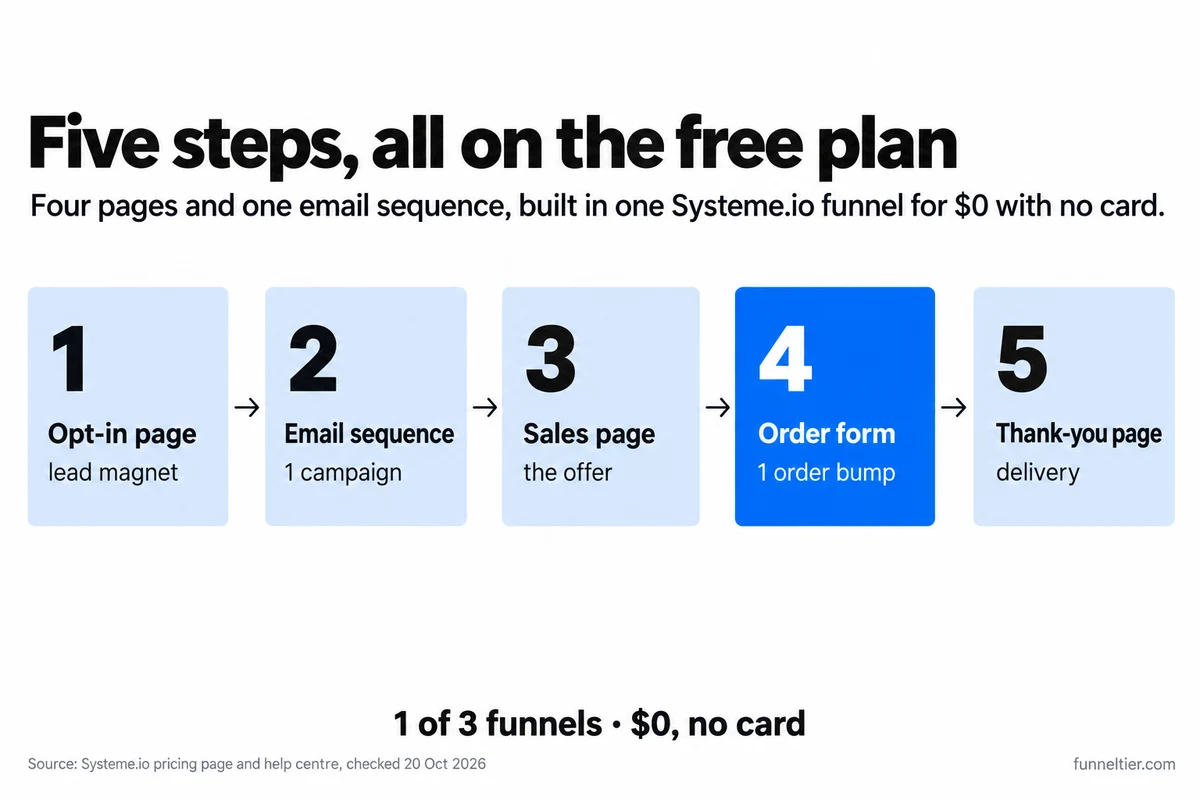
We build this on Systeme.io because its free plan puts pages, checkout and email in one account. The pricing page lists 3 sales funnels, 2,000 contacts, unlimited emails, 1 course and 0% transaction fees on Free. Without email and payments, a funnel is only a landing page. If you’d like to see the other options first, we compared every free funnel builder.
This guide sells your own product: a course, an ebook, a template pack or a service. Promoting other people’s offers is a different build (no checkout, an affiliate button on the thank-you page), covered in building an affiliate funnel on the free plan.
What should you have ready before you start?
Get these three sorted before you open the account, which is the quick part.
Something to sell. If you have nothing yet, there are ready-made products you can rebrand and sell. Check your product against Systeme.io’s terms first. Article 11 bans content related to “pornography, gambling, illegal products, violence”, plus exploitation, illegal acts and fraud.
A lead magnet. One short checklist or guide that solves a small problem your product solves completely. Email attachments are capped at 5 MB, so plan to send a download link instead.
A domain you own. None of the free-funnel guides we read mention this. Your pages can run on the free yourname.systeme.io subdomain from day one. Your emails can’t. Systeme.io’s help centre is blunt: “Authentication of a domain name is mandatory to send emails from systeme.io.” Gmail, Yahoo and ProtonMail addresses can’t be authenticated, and the domain needs an active website linked to it, because a 404 can get your emails blocked. A domain costs a yearly fee that varies by registrar, and it’s the only fixed bill in this build.
How to create a sales funnel for free, step by step
All ten steps work on the free plan. The menu paths come from Systeme.io’s help centre, which we checked on 20 October 2026. If a label has moved, search the help centre for the step name.
Step 1: Open a free Systeme.io account
Sign up for Systeme.io. The homepage says “No credit card required”, and the pricing FAQ says the free plan “never expires and does not require a credit card.” Your free subdomain works straight away, so you can build pages while the domain is pending.
Don’t upgrade on day one either. The terms say “our subscription plans are not refundable.”
Step 2: Authenticate your domain for email
Go to Profile → Settings → Emails → Domains and add your domain. You’ll get three CNAME records and one DMARC (TXT) record to add at your DNS host, usually where you bought the domain. The help article also asks you to contact Systeme.io support once the records are in. New accounts don’t email everyone at once, and we explain why your first 500 emails send in batches in the affiliate guide.
Step 3: Connect Stripe (and PayPal)
Click your profile picture → Settings → Payment Gateways → Connect next to Stripe. Log in to Stripe or create an account, choose your country and business type (individual, company or nonprofit), verify your details, then click “Authorize access to this account.”
One requirement trips people up later: every payment page must include Email and First Name fields or Stripe won’t work. PayPal is the other option. You switch card and PayPal payments on per funnel in Step 5.
Step 4: Set up the product so it delivers itself
This step decides the whole build, and none of the ranking guides we read mention it.
Free gives you one automation rule. In Step 9 you’ll spend it on subscribing new opt-ins to your email sequence, because without it the funnel has no follow-up. So your product has to reach the buyer without a rule. The help centre documents two ways that need none:
| Delivery method | Needs a rule? | Works on Free? |
|---|---|---|
| Course: automatic enrollment set on the order form | No | Yes (1 course, 500 students) |
| Ebook or templates: download link on the thank-you page | No | Yes |
| Ebook attached to a "New sale" email (max 5 MB) | Yes | Only by giving up your sequence |
| Download link inside a "New sale" email | Yes | Only by giving up your sequence |
A course is the cleanest choice. Buyers are enrolled automatically and “automatically receive an email with instructions on how to set a password.” You can’t customise that email, but it doesn’t use your rule. Create the course before Step 8 so it’s there to pick. For an ebook or template pack, put the download link on the thank-you page.
Step 5: Create the funnel
Go to Sites → Sales funnels → Create. Enter a Name, pick the Domain (the free subdomain is fine for now) and the Currency, then choose the Sell type, which creates an order form and a thank-you page. The other types are Build an Audience (opt-in plus thank-you), Custom (blank) and the evergreen webinar funnel, which needs the Webinar or Unlimited plan.
Now add the two missing pages. In the funnel’s left menu, click Add step, set the Type to Opt-in page, pick a template or start from scratch, and Save. Repeat with Sales page.
Arrange the steps as opt-in → sales page → order form → (upsell) → thank-you. The help centre says the post-payment steps must sit in that order or the links between them won’t work, and it has a separate guide on moving funnel pages if a new step lands in the wrong place.
Last, open Funnel settings, tick “Credit card or debit card” and/or PayPal, and Save. Switch to your own domain in the same settings once it’s ready; the change applies to every page. This funnel uses 1 of your 3 funnels and 4 of the 15 funnel steps Free allows (5 with an upsell).
Step 6: Build the opt-in page
Click Edit page on the opt-in step. Keep it short: a headline that names the reader’s problem, three bullets on what the lead magnet gives them, one email field, one button.
The form needs “at least one Email field.” Set the button’s “Action when button clicked” to Submit form and the redirect to To the next step. Your sales page then becomes the first thing a new subscriber sees, while they’re still interested.
Double opt-in is optional. Contacts who don’t confirm within 24 hours are deleted automatically. That keeps fake addresses off your 2,000-contact allowance, at the cost of every real reader who doesn’t click in time.
Step 7: Write the sales page and link it to the order form
For a first offer, we’d use this structure: the problem, the offer in one sentence, what’s inside, the price, one button. Answer the obvious objection near the button.
The link is the part people get wrong. The sales page button doesn’t use Submit form. Set its action to Open URL and paste the order form’s URL.
Step 8: Configure the order form, price and order bump
Open the order form step and “Choose offer type.” Pick Digital, choose the resource Courses and your course, and set the access type: Full access, Partial access or Drip content. Then add a price plan: a one-time payment, a subscription (with an optional trial) or a payment plan with a fixed number of payments.
Now the order bump. On the payment page, click “Add order bump,” choose the offer type and a resource: Courses, Course bundles, Tags or Communities (not calendar events). On Free, the community is the sensible bump, because the plan includes one and it delivers itself like the course. Give it a single price, then open the page editor and drag the Order bump element into the page body. Creating the bump and placing it on the page are two separate jobs.
PayPal may show only the main price, and the product and bump are charged as two separate transactions.
Optional upsell. Add step → Type Upsell, straight after the order form. Free allows one. Because your only rule is already taken, the upsell’s resource also has to deliver itself, and Free includes just 1 course and 1 community. Our advice, worked out from those limits: if the course is your product and the community is your bump, leave the upsell out until you upgrade.
Step 9: Write the follow-up sequence and spend your one rule
Create one email campaign. Five emails is plenty for a first sequence:
- Deliver the lead magnet as a link.
- Tell the story behind the product.
- Teach one useful thing.
- Answer the main objection.
- Make the offer, linking to the sales page.
Then spend your rule. Go to Automations → Rules → Create. Set the trigger to Funnel step form subscribed and pick your opt-in page. Set the action to Subscribe to campaign, pick the campaign and Save rule. A rule can carry more than one action, so an Add tag action can ride along without using a second rule (Free allows one tag).
Step 10: Test it with a real $1 purchase
The help centre says: “It is not possible to perform a test purchase via Stripe.” So set the price to $1, open the order form through “View funnel step,” and buy it with your own card. Tick the bump, check that you land on the thank-you page and get the course email, then refund yourself under Sales → Transactions and put the real price back. The help centre warns it “may incur additional fees,” so you may lose a few cents.
Finally, opt in with a second email address and check that email 1 arrives.
Build these 10 steps on Systeme.io’s free plan →
Which free-plan limit will you hit first?
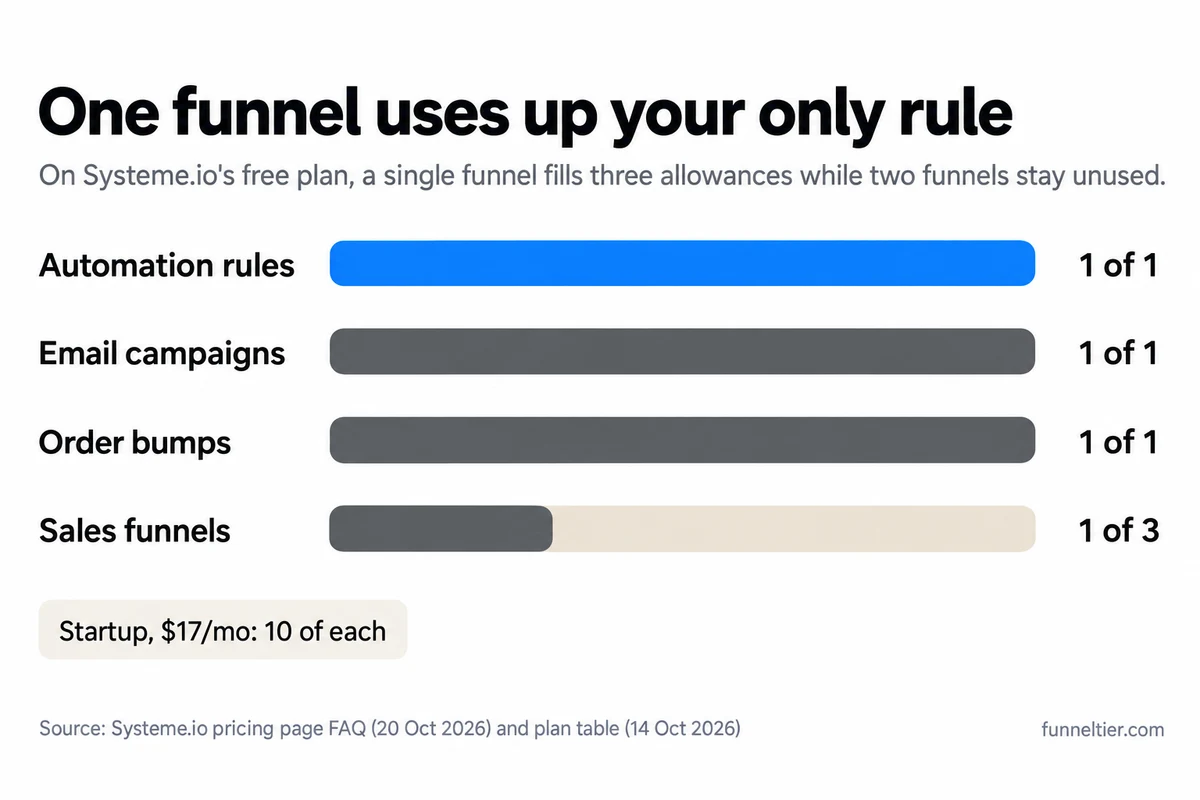
The automation rule, by a long way. The table shows what this one funnel uses.
| Limit | Free | This funnel uses | Startup ($17/mo) |
|---|---|---|---|
| Automation rules | 1 | 1 | 10 |
| Email campaigns | 1 | 1 | 10 |
| Order bumps | 1 | 1 | 10 |
| One-click upsells | 1 | 0-1 | 10 |
| Sales funnels | 3 | 1 | 10 |
| Funnel steps | 15 | 4-5 | 50 |
| Contacts | 2,000 | Grows | 5,000 |
Plan-table figures read 14 October 2026; FAQ figures re-checked 20 October 2026.
One funnel spends the rule, the campaign and the bump in full, while two of your three funnels sit unused. You run out of automation long before you run out of pages.
In practice, the limits bite in this order:
- A second email sequence. Buyer onboarding or a second lead magnet needs a second rule and a second campaign.
- A second product with its own bump. Free has one order bump.
- Contact 2,001. You get three warning emails, one a day. On day 4, opt-ins and payments stop working, newsletters aren’t sent and campaigns pause.
- $10,000 in lifetime sales. A warning banner appears at $8,000. At $10,000, “your payment pages will stop accepting new sales,” and you get an email and 3 days to upgrade. Free accounts are never upgraded or charged automatically, and affiliate commissions don’t count. At $27 a sale, that’s about 370 sales, with the warning around sale 297.
Every ranking guide we read that quotes Systeme.io’s limits gets at least one number wrong:
"The Startup plan costs $27 a month"
Startup is $17 a month, checked 20 October 2026.
"Custom domains are paid only"
The free plan includes 1 custom domain.
"Free has unlimited order bumps"
Free has 1 order bump, 1 upsell and 1 coupon code, per the plan table.
Lifting the caps costs $17 a month for Systeme.io’s Startup plan: $204 a year paid monthly, or $170 paid annually (“2 months free”). Rules, campaigns, bumps, upsells and funnels go to 10 each, steps to 50, contacts to 5,000. Paid plans aren’t refundable, so upgrade when a cap blocks you, not before. Cancel later and you keep the paid plan until the next billing date, then drop back to Free. For the higher tiers, see every Systeme.io limit and what lifts it.
What does a “free” sales funnel really cost?
The list is short, but it isn’t empty.
- Software: $0. Systeme.io takes 0% of your sales on every plan, and file storage is unlimited.
- Domain: a yearly registrar fee. It varies by registrar and extension.
- Payment processing. Stripe’s standard US rate is 2.9% + 30¢ per successful domestic card charge, plus 1.5% for international cards and 1% if currency conversion applies (checked 14 October 2026).
- The $1 test purchase. A few cents, once.
- Traffic and time. Free includes one blog, so organic content can live in the same account.
On a $27 sale, Systeme.io takes $0 and Stripe takes about $1.08 ($0.78 + $0.30). You keep about $25.92.
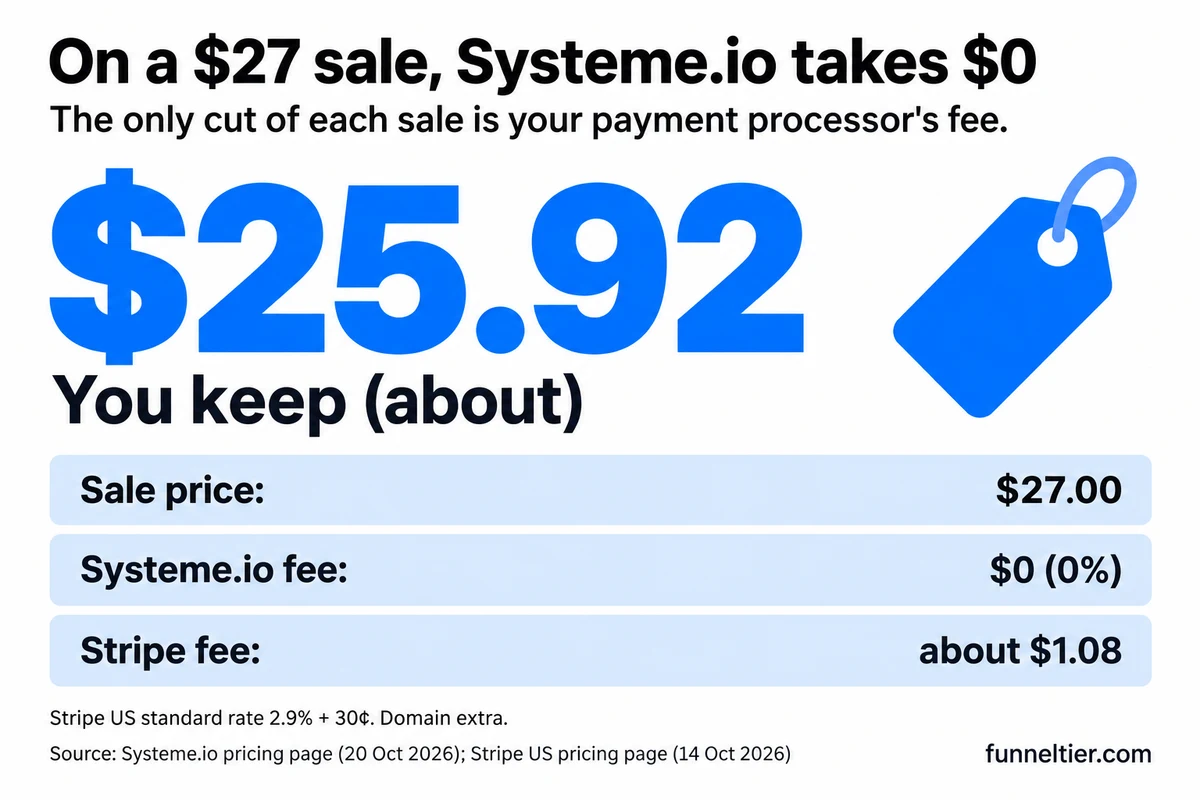
So the builder costs $0, and what you pay for is a domain and the processor’s cut of each sale. If you’re weighing a WordPress plugin or another builder instead, check which free tools are really free before you commit.
Start free on Systeme.io, pay $17 only when you outgrow it →
What if you’d rather use ClickFunnels?
ClickFunnels has no free plan. It has a 14-day trial with “$0 due today” and a required Payment Information step: “We ask for a payment method so that your subscription and business can continue without interruption after your trial ends.” After 14 days, Launch bills $97 a month, or $970 a year billed annually (about $81 a month).
The checkout also offers an optional one-time “Funnels & Templates” add-on for $47. You can skip it. After the first charge, a 30-day money-back guarantee applies, which ClickFunnels counts as “risk-free for a total of 44 days.” Here’s how the 14-day trial and 30-day guarantee work.
ClickFunnels suits you if you want its builder specifically, if your first funnel already needs more than one course or 2,000 contacts, or if you want a refund safety net that Systeme.io’s paid plans don’t offer. It’s not for anyone who won’t put a card down or hasn’t got an offer ready, because the trial clock runs either way. We compare them in ClickFunnels vs Systeme.io and break down what ClickFunnels costs after the trial.
Stay at $0 with Systeme.io’s free plan, no card on file →
Common mistakes when building a free funnel
- Spending the one rule on something minor. It belongs to the opt-in → sequence link.
- Delivering the product with a “New sale” email rule. On Free, that takes the rule your sequence needs.
- Copying the help centre’s bump-plus-tag pattern. It has the bump add a tag that triggers an email through a second rule, which Free doesn’t have.
- Sending from a Gmail or Yahoo address. Those can’t be authenticated, and authentication is mandatory.
- Forgetting the First Name field. Stripe needs Email and First Name on every payment page.
- Linking the sales page button wrongly, or leaving steps out of order. Use Open URL with the order form’s URL, and keep order form → upsell → thank-you.
- Skipping the $1 test. There’s no Stripe test purchase on Systeme.io, so a real one is your only proof the checkout works.
- Upgrading to annual on day one. Paid plans aren’t refundable.
And don’t import a list you didn’t build: your 2,000 contacts should be people who asked to hear from you. If you’d rather not build any of this yourself, done-for-you sales funnels are the other route, at a price.
Get a free Systeme.io account and follow the 10 steps →
Frequently asked questions
Can you really create a sales funnel for free?
Yes. Systeme.io's free plan costs $0, needs no card and never expires, and it covers opt-in pages, email, checkout with an order bump, and a thank-you page. What you still pay for is a domain for email and your processor's fee on each sale.
How do I build a sales funnel with no money?
Use the free plan, buy one domain, and drive organic traffic. Deliver the product without an automation rule (course enrollment or a thank-you-page download), save your one rule for the email sequence, and test checkout with a $1 purchase you refund.
How do I create a sales funnel in Systeme.io?
Go to Sites → Sales funnels → Create, enter a name, domain and currency, and pick the Sell type. Add an opt-in page and a sales page with Add step, put them ahead of the order form, and switch on payments in Funnel settings. If you'd rather learn with guidance, see our pick of a sales funnel course.
Do I need a website or domain to build a free sales funnel?
Not for the pages, which run on your free systeme.io subdomain. You do need a domain for email: authentication is mandatory, Gmail and Yahoo addresses can't be authenticated, and the domain must have a live page linked to it.
Can I take payments on a free sales funnel?
Yes, through Stripe or PayPal, with 0% transaction fees to Systeme.io. Free accounts have a $10,000 lifetime sales limit. At that point payment pages stop accepting new sales until you upgrade, but you're never charged automatically.
Can I add an order bump or upsell on Systeme.io's free plan?
One of each, per the plan table. Each needs a resource that delivers itself, such as a course or a community, because your one automation rule is already working for the email sequence.
What happens when I outgrow the free plan?
A second email sequence, a second order bump or your 2,001st contact all point to Startup at $17 a month. Over the contact limit, opt-ins and payments stop on day 4 after three daily warnings. We list every Systeme.io limit and what lifts it.
Does ClickFunnels have a free plan?
No. It has a 14-day free trial that needs a card, then Launch bills $97 a month, with a 30-day money-back guarantee after the first charge. Our guide to the ClickFunnels trial has the details.
How do I test my sales funnel before launch?
Stripe test purchases aren't possible on Systeme.io. Set the price to $1, buy through "View funnel step," refund yourself in Sales → Transactions and reset the price. Then opt in with a second email address and check that email 1 arrives.
The bottom line
Building a sales funnel for free comes down to one decision the guides we read all miss: spend the single automation rule on the opt-in sequence, and let course enrollment or the thank-you page deliver the product. Buy a domain, connect Stripe, build the four pages, test with $1, and launch.
Then leave the plan alone until a limit blocks you. A second sequence, a second bump or your 2,001st contact is the moment to pay $17 a month, not a day earlier. Our Systeme.io review covers the rest of the platform.
Build your first funnel on Systeme.io for $0 →
Ready to build your first funnel?
Start with ClickFunnels — the tool we test and recommend — and have a working funnel published today.
Start the 14-day free trial →