ClickFunnels for affiliate marketing pays off when you promote high-ticket or recurring offers, already have traffic, and want the bridge page, follow-up emails and stats under one login. It even ships a ready-made Bridge Funnel type for this. It is the wrong first buy for Amazon-only or low-commission beginners. At a $10 commission, the $97/month Launch plan needs 10 sales a month just to cover itself, so start on Systeme.io’s free plan instead. Launch costs $97 a month or $970 a year. The 14-day free trial needs a card, and a 30-day money-back guarantee follows it. Whatever you promote, make the reader click through to the offer: Amazon pays nothing on automatic redirects. We checked prices and rules on 20 October 2026.
We may earn a commission if you sign up through links on this page, at no extra cost to you. This does not affect our ratings. See how we test.
Start the ClickFunnels 14-day free trial, $0 due today →
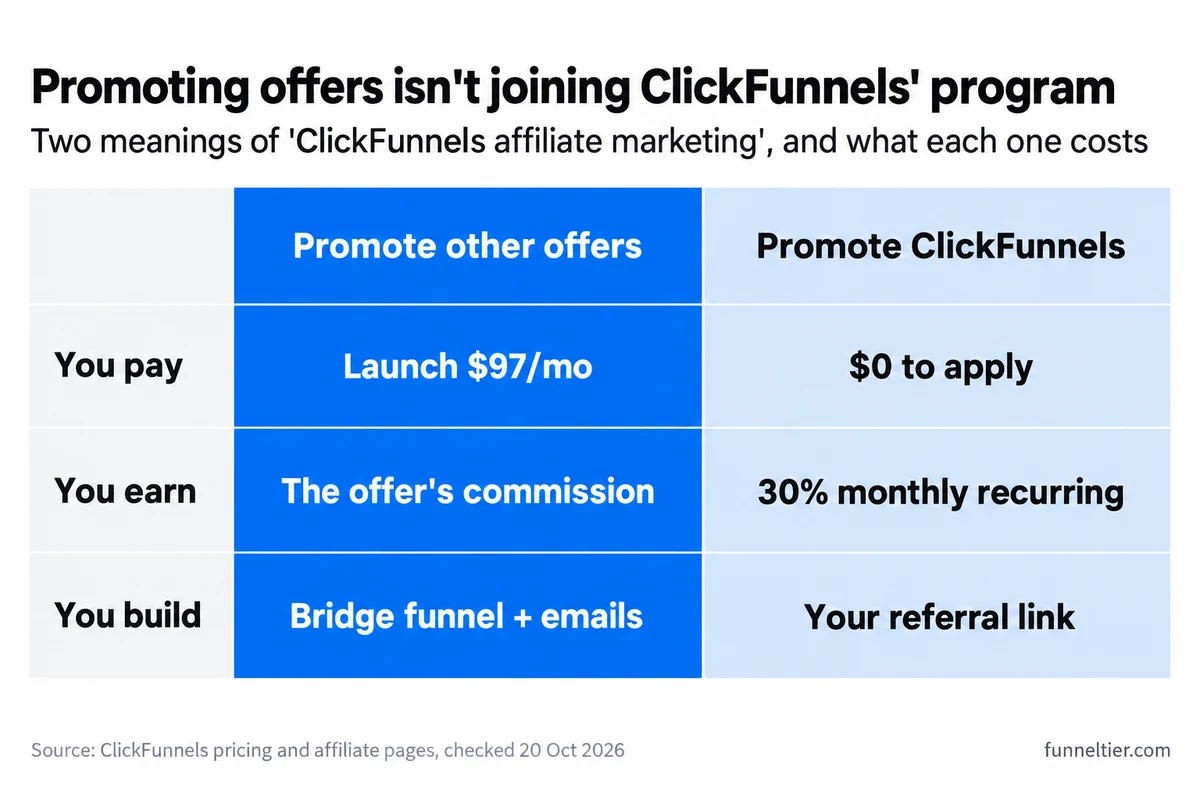
This page is about using ClickFunnels to promote other people’s offers. Joining ClickFunnels’ own affiliate program is a different thing, and it gets one FAQ at the end. It is also a fit-and-cost page. If you want every click, our step-by-step free affiliate funnel build has them.
Is ClickFunnels good for affiliate marketing?
Yes, when the offer pays enough and you will actually use pages, email and stats in one place. ClickFunnels gives you all three, plus a funnel type built for sending people to “a sales page you don’t control”, which is how its own help centre describes the Bridge Funnel.
It is overkill when commissions are small. The software costs the same $97 whether each sale pays you $10 or $300, so commission size decides the verdict more than any feature does. The maths is further down. The platform as a whole is in our full ClickFunnels review.
“ClickFunnels affiliate marketing” means three different things
Most pages ranking for this topic blur them together. They cost different amounts and need different plans:
| What you do | Plan you need | What you earn |
|---|---|---|
| Promote other people's offers with ClickFunnels pages and email | Launch, $97/mo | The offer's commission |
| Promote ClickFunnels itself | Free to apply | 30% monthly recurring |
| Run your own affiliate program (Affiliate Center) | Optimize ($297/mo) and up, per ClickFunnels' help centre | Sales your affiliates send you |
The rest of this page is about the first row. The second row only needs a referral link, and the third is for people who own a product.
Older pages also carry facts that stopped being true:
"40% recurring commission plus a 5% second tier"
ClickFunnels' affiliate page says 30% monthly recurring and lists no tiers.
"Basic $127, Pro $157, Funnel Hacker $208" or "Platinum"
Retired plans. Today it is Launch $97, Scale $197, Optimize $297 a month, and Dominate at $5,997 a year.
"You can't blog with ClickFunnels"
It has a Site & Blog app with SEO fields and post scheduling.
Who is ClickFunnels for in affiliate marketing?
ClickFunnels earns its $97 when most of these describe you:
- You promote high-ticket or recurring offers. If a sale pays $100 or more, one sale a month covers Launch. Recurring software or membership commissions keep paying after that.
- You already have traffic. An email list, a YouTube channel, a podcast or an ad budget. ClickFunnels does not bring visitors. It turns the ones you send into subscribers and clicks.
- You want one login and one bill. Opt-in page, bridge page, follow-up emails and stats in one place. Launch includes 10,000 contacts and 50,000 emails a month, which is plenty for most affiliate lists.
- You will run several bridge funnels. Funnels are unlimited on every plan, and Launch allows unlimited visitors. The pricing page tags unlimited funnels “Limited Time” without saying what that means, so don’t build a five-year plan around it.
- You might sell your own product later. Launch already includes 3 courses, and ClickFunnels’ pricing FAQ says it takes no cut: “You’ll keep every penny you make.” If that is where you are heading, see how to sell your own product instead.
You also don’t need a separate website to start. ClickFunnels hosts the pages on your own domain and has a blog app. Launch allows 5 custom domains, which only pinches if you like one domain per niche.
Put together, using ClickFunnels for affiliate marketing makes sense once you have an offer worth promoting and people to show it to. It won’t find either of those for you.
Build your first ClickFunnels bridge funnel free for 14 days →
Who should skip it and start free instead?
Three kinds of affiliate should keep their $97 for now.
Amazon-only affiliates. If your Amazon commissions come to a few dollars a sale, even the $10 row in the maths below is generous, and Amazon’s link rules (below) rule out the lazy redirect setup. A content site or a free funnel tool fits those economics better.
Beginners with no offer, traffic or list yet. You would spend the 14-day trial learning what a bridge page is, not testing whether one sells. The card gets charged on day 14 either way.
Anyone for whom $97 a month is a stretch. If the funnel has to earn before you can afford it, don’t start on a tool that bills you as soon as the 14 days are up.
For all three, Systeme.io’s free plan is the sensible first step. It costs nothing, needs no card and does not expire:
Free’s single rule and single campaign run exactly one lead magnet and one follow-up sequence. That is all a first affiliate funnel needs. You can build the same bridge funnel free, step by step, and Systeme.io’s paid plans start at $17 a month (Startup) when you outgrow it. If you later sell something of your own, build a sales funnel for free on the same plan. For other no-cost options, we compared free ClickFunnels alternatives.
Open a free Systeme.io account, no card needed →
What does ClickFunnels cost an affiliate, and when does it pay for itself?
ClickFunnels has four plans, and an affiliate only needs to think about two. Launch is $97 a month, or $970 a year (about $81 a month). Scale is $197 a month, or $1,970 a year (about $164 a month). Optimize ($297 a month) and Dominate ($5,997 a year, annual billing only) are built for volume and teams that an affiliate funnel won’t reach. All prices are before tax, from ClickFunnels’ pricing page on 20 October 2026. Every ClickFunnels plan and price has its own breakdown.
How many sales cover $97 a month?
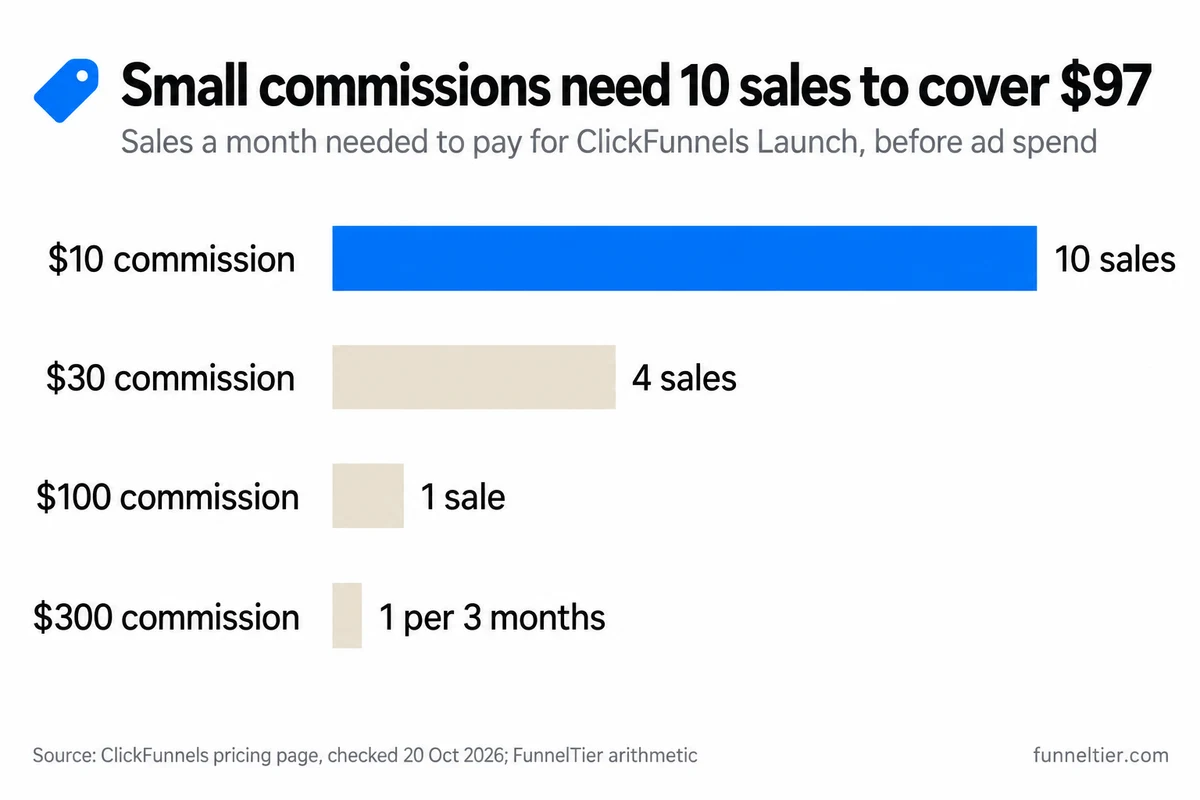
This is the number most guides skip. The software costs the same whatever your offer pays, so the commission per sale decides how hard Launch is to cover:
| Commission per sale | Sales a month to cover $97 | Exact figure |
|---|---|---|
| $10 | 10 | 9.7 |
| $30 | 4 | 3.2 |
| $100 | 1 | 0.97 |
| $300 | 1 every 3 months | 0.32 |
That is our arithmetic from the published Launch price, and it is a floor. It comes before ad spend, your domain and any other tool you pay for. At a $10 commission you need 10 sales a month just to stand still, which is a lot to ask of a beginner’s first funnel. At $300, one sale every three months covers it.
Over a year, Launch costs $1,164 on monthly billing ($97 × 12) against $970 on annual. The $194 saving is not worth locking in before a funnel has earned anything. Pay monthly until it does, then switch: ClickFunnels’ pricing FAQ says you can change your plan “at anytime”, during or after the trial.
ClickFunnels also sells 3 months of Scale for $99, charged upfront with no trial, but affiliates rarely need Scale, so the $99 Scale deal and other real discounts matter less here than the free trial does.
Launch or Scale for affiliate funnels?
Launch, for almost every affiliate. Here is what the extra $100 a month buys:
| Limit | Launch | Scale |
|---|---|---|
| Price | $97/mo | $197/mo |
| Contacts | 10,000 | 75,000 |
| Emails a month | 50,000 | 300,000 |
| Custom domains | 5 | Unlimited |
| Team members | 2 | 5 |
| Webhooks and full API | No | Yes |
Pick Scale only if you need webhooks or the API (to push leads into an outside tracker, for example), more than 5 domains, more than 10,000 contacts, or a team. Otherwise the extra money buys nothing a bridge funnel uses. We compared Launch vs Scale, limit by limit if you are on the fence.
Try Launch free for 14 days, then $97 a month →
How does a ClickFunnels bridge page work?
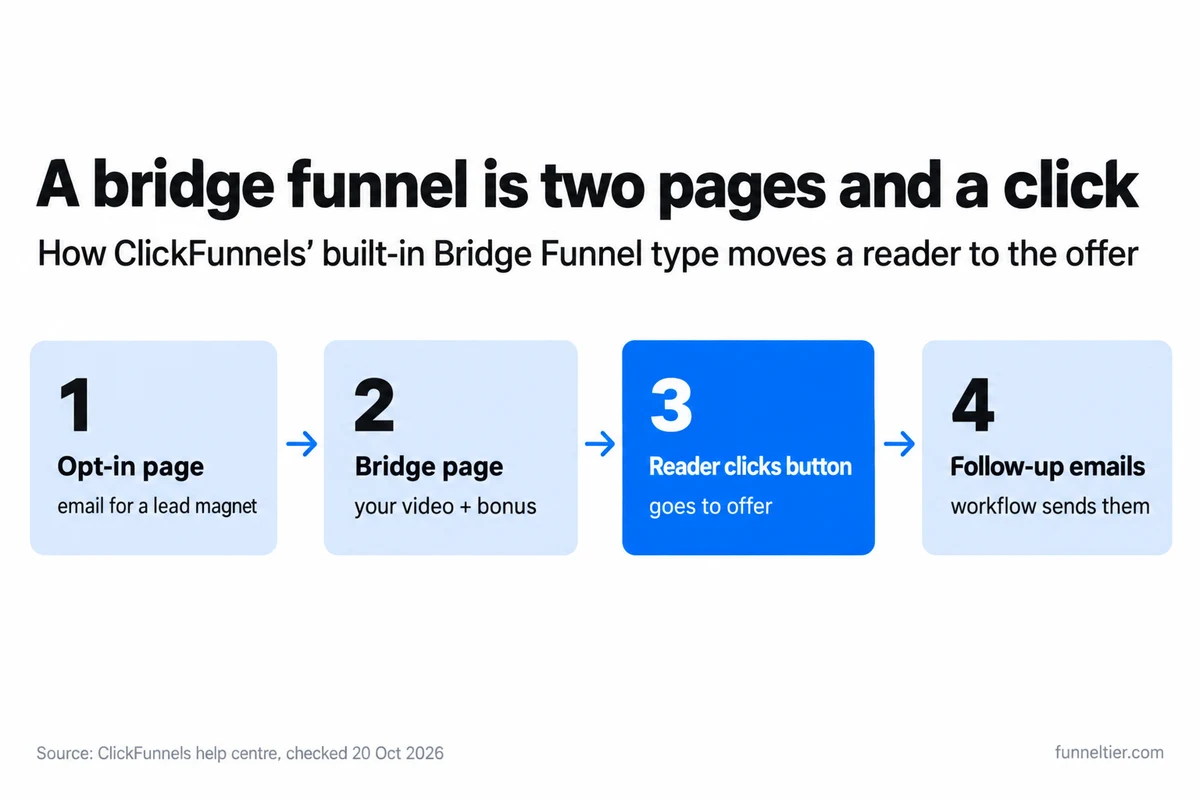
A bridge page sits between your traffic and the offer. You warm the reader up with your own take, then send them on. ClickFunnels builds it as a funnel type of its own, which its help centre calls “a simple two-page funnel that helps you warm up leads”:
- Opt-in page: a headline, a short description and a form, usually with a lead magnet.
- Bridge page: introduces the offer, often with a video, and ends in a button to the external sales or checkout page. An optional bonus section lists extras you give people who buy through your link.
- Follow-up emails: a workflow, triggered from a funnel step, that sends emails, tags the contact or delivers an asset, with delays in between.
Setting one up is four steps. This is the outline, not a tutorial:
-
Create the funnel
Funnels → Create Funnel → Bridge Funnel, then pick a template or Start from Scratch.
-
Edit both pages
Write the opt-in offer, then your honest take on the product for the bridge page.
-
Point the button at your link
Set the button to Go to → Custom URL and paste your affiliate link. The reader clicks it.
-
Add the follow-up and go live
Use the lightning-bolt icon on a step to add a workflow (Send an Email, Tag Contact, delays), then switch to Live Mode.
Before the first email goes out, verify a sending domain. ClickFunnels needs it to send from your own address: DKIM, SPF, DMARC and CNAME records, up to 72 hours to propagate, and a 2048-bit DKIM key. If your DNS host can’t take TXT records over 255 characters, ClickFunnels suggests moving DNS (Cloudflare is its example). Then warm the domain up. Its help centre says to start small, “e.g. 10-100 emails/day”.
One caveat on automation: the bridge-funnel and workflow help articles list no plan requirement, and the pricing page does not settle it either. Build the follow-up workflow during the trial and confirm it runs on Launch before day 14.
If writing pages is the slow part, you can let Build with AI draft the pages. If you would rather start from a design, our guide to ClickFunnels templates covers where they come from and what they cost, which is worth reading before you pay for that $47 order bump.
What ClickFunnels can’t tell you about your commissions
ClickFunnels shows page views (all and unique), opt-ins per step with a conversion rate, and email opens, clicks and click-through rate. Its sales, recurring sales and earnings-per-view figures count sales made through ClickFunnels’ own checkout. Your commission happens on the network’s side, so it never shows up there.
We found no outbound-link click report in ClickFunnels’ help centre, and broadcast stats show clicks per email, not per link. The click from your bridge page to the offer is the number you have to get elsewhere.
The workaround is cheap:
- one bridge funnel per offer or per traffic source, so opt-ins stay separate;
- your network’s sub-ID or tracking ID on each button (ClickBank calls it a TID);
- a weekly look at opt-ins in ClickFunnels next to clicks and commissions in the network report.
Set up a ClickFunnels Bridge Funnel on the 14-day free trial →
What rules decide whether an affiliate funnel earns?
The software is the easy part. Three sets of rules decide whether a funnel built with ClickFunnels for affiliate marketing actually gets paid. None of the ranking pages we checked covers Amazon’s redirect rule or Google Ads’ bridge-page rule.
Make the reader click: the setting to avoid
ClickFunnels’ Submit Form button has an option called “Enable Redirect Override”. It sends the visitor to “a custom URL or a relative path” the moment the form submits. Point that at an Amazon link and you have built exactly what Amazon won’t pay on.
Amazon’s Associates policies (updated 14 April 2026) pay no fees on purchases from “a link that sends users indirectly to an Amazon Site via an intermediate site… without requiring the customer to click on a link or take some other affirmative action on that intermediate site.” The same policies ban Special Links in pop-ups and transitional pages, ban framing an Amazon Site, and ban cloaking or shortening a link so it is unclear that it goes to Amazon.
So keep the affiliate link on a button the reader clicks, on the bridge page. Use the opt-in redirect only to move people to your own bridge page. Amazon also requires you to identify your Site in your application, so list the ClickFunnels domain you use. And it pays nothing on purchases from ads that bid on “amazon”, “kindle” or other Amazon marks.
Other networks set their own rules, so read your program’s terms before you send traffic. Amazon’s position on links inside emails is covered in the Systeme.io walkthrough linked earlier.
Paid traffic: Google Ads’ bridge-page rule
Google Ads’ “Insufficient original content” policy lists “Bridge pages, doorways, gateways, or other intermediate pages that are only used to link to other sites” among destinations it does not accept. Google says “a warning will be issued at least 7 days prior to any suspension of your account.”
A headline, a video embed and a button is exactly that kind of page. If you run ads to a bridge page, give it something the offer page doesn’t have, such as your own review and test results or a bonus of yours.
Organic traffic and disclosure
Google Search’s spam policies define thin affiliation as affiliate content where descriptions and reviews are “copied directly from the original merchant without any original content or added value”. They name “original product reviews, rigorous testing and ratings… and product comparisons” as the kind that is fine. A post on ClickFunnels’ blog app can rank like any other page, as long as it says something the merchant’s page does not.
Disclose, too. The FTC’s influencer guidance says to disclose “any financial, employment, personal, or family relationship with a brand” and to put it where it is “hard to miss”. On a bridge page, that means next to the button, not on an About page.
How to test ClickFunnels for affiliate marketing in 14 days
The trial is long enough to answer one question: does one bridge funnel for one offer turn traffic into commissions? Run ClickFunnels like this:
Build one funnel
One Bridge Funnel for one offer. Start the domain verification on day 1, because DNS can take 72 hours.
Send real traffic
Your list, your channel or a small ad budget, to a bridge page with real content on it.
Compare the numbers
Opt-ins in ClickFunnels against clicks and commissions in your network report.
Decide
First charge: $97 on Launch. The 30-day money-back window runs after that.
Read day 12 honestly. If one offer is converting, stay. If you had opt-ins but no commissions, look at the offer or the bridge copy first. Fix that before you pay for any software. If you had no traffic at all, cancel from your dashboard before day 14 and come back when you do.
Day 14 to day 44 is the money-back window, so a late decision still costs nothing. The details are in how the 14-day trial and refund window work.
Test one affiliate offer on ClickFunnels free for 14 days →
Frequently asked questions
Is ClickFunnels good for affiliate marketing?
Yes, if you promote high-ticket or recurring offers and already have traffic: at a $100 commission, one sale a month covers ClickFunnels Launch at $97. No, if you are an Amazon-only or low-commission beginner. At $10 a sale you need 10 sales a month just to break even.
Can I use ClickFunnels for affiliate marketing without my own product?
Yes. The Bridge Funnel type is built for sending traffic to a sales page you don't control. You build an opt-in page and a bridge page, and the bridge page's button goes to your affiliate link.
Can I use ClickFunnels for Amazon affiliate links?
Yes, on a page where the reader clicks a button to reach Amazon. Not through an automatic redirect after the opt-in form: Amazon pays no commission on those, and it also bans cloaked links, pop-ups, transitional pages and framing.
What is a ClickFunnels bridge page?
The second page of ClickFunnels' two-page Bridge Funnel. It introduces the offer, often with a video, can list bonuses for people who buy through your link, and ends with a button to the offer's sales or checkout page.
How much does ClickFunnels cost for affiliate marketing?
Launch is $97 a month or $970 a year, before tax. The 14-day free trial has $0 due today, but a card is required. Our trial link opens on the Scale checkout at $197, so choose Launch in the pop-up and untick the optional $47 order bump.
Do I need a website as well as ClickFunnels?
No. ClickFunnels hosts your pages on your own domain (5 custom domains on Launch) and has a Site & Blog app. You do need to verify a sending domain before you email your list.
Is ClickFunnels or Systeme.io better for affiliate marketing?
Systeme.io's free plan for beginners: no card, 3 funnels, 2,000 contacts. ClickFunnels once your commissions comfortably cover $97 a month. The full head-to-head is in ClickFunnels vs Systeme.io.
Can ClickFunnels track my affiliate sales?
Not the commissions themselves. ClickFunnels tracks page views, opt-ins and email opens and clicks, and its sales figures count only its own checkout. Add your network's sub-ID to each link and compare opt-ins against the network report.
How does the ClickFunnels affiliate program work?
That is a different thing from this article: you promote ClickFunnels itself. Anyone can apply, and being a customer is not listed as a requirement. It pays 30% monthly recurring on every active account that signs up through your link, on every plan, so a Launch referral is worth $29.10 a month and a Scale referral $59.10 (our arithmetic). Four active Launch referrals cover your own Launch plan. Payouts are monthly, ClickFunnels' help centre describes a 30-day cooling period before commissions pay out, and affiliates with 100+ active members get their car lease or purchase payment reimbursed.
The bottom line
ClickFunnels for affiliate marketing is a good buy for one kind of affiliate: you promote high-ticket or recurring offers, you already send traffic somewhere, and you want pages, email and stats on one bill. At $100 a sale, one sale a month covers Launch.
It is a poor first buy if you are Amazon-only, your commissions sit around $10, or you have no traffic yet. Start on Systeme.io’s free plan, get one offer converting, then take the ClickFunnels trial and switch to Launch at checkout.
Either way, the rules are the same: a button the reader clicks, a disclosure beside it, and a sub-ID on every link.
Start the ClickFunnels free trial and pick Launch at checkout →
Ready to build your first funnel?
Start with ClickFunnels — the tool we test and recommend — and have a working funnel published today.
Start the 14-day free trial →